Nervier
Members
-
Joined
-
Last visited
-
Oh sorry - yes, that seems to be base64-encoded, but base64-decoding it yields gibberish as the entire contents being shared are encrypted with the PSK. \

-
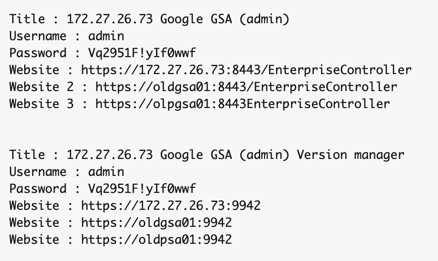
No... the "Export" does a *full* export of all records, all fields, in plain text, password included (on MacOS). So much worse than exporting a single item in plain text. And then they go on talking about "due to data security reasons" we force you to encrypt with a PSK an individual item. So frustrating... Here's a sample screenshot.... (the appliances doesn't exist anymore - it's a 10yr old account)
-
Amandeep, Can you please explain what you mean by your vague "due to datea security concerns"? I need to give my account info to other users. They do not use Enpass. I thus *MUST* send it to them in clear text. I do that via Signal. It's secured, and encrypted. There are ZERO security concerns with this process. But without the ability to now export an entire record from Enpass, I have to copy/paste each individual field in every account and copy/paste into a message/note so that I can then send it. It's incredibly time-consuming. All because you decided to prevent us from exporting the same record with one click? As another user in the thread said, what where you guys thinking?? You're not making the app more secure, you are actually making it worse as I now have to copy/paste these individual entries in a note, so that when done I can "select all" and then send with signal, and then (1) ALL those passwords will be in my clipboard which I could inadvertently paste somewhere else, and (2) I need to remember to delete the note, and (3) I have to delete it from the deleted items in iCloud as it will be stored there too. So as you see you're making matters much LESS secure by preventing me to share the items directly from Enpass. And as another user also said, when creating a backups those are in clear text anyways, so, again, please explain your "due to data security concerns" statement again?
-
I too needed to share some of my accounts (they're generic - admin, webmaster, etc) with my coworkers, and just found out that I cannot because the MacOS and the iOS apps are now forcing me to encrypt them with a password. They're not using enpass, so now I can't share the information.... I thought I remember being able to do it in the past and just saw this thread that confirmed that I hadn't imagined it. What kind of stupid decision is this to remove the ability to share items unless they are password-protected? I'm sharing them with people I know via Signal, so they're secured already. And now I'm going to have top copy/paste each entry in wordpad (I have over a dozen, it's going to be a pain...) and then send them like that - (UNENCRYTPED). Why are you making me go thru all these steps when the app should simply allow me to export them unencrypted to begin with?? With the PSK you're requiring the other users to have Enpass as well, which is NOT the case. Please re-enabled that setting again so we can remove the PSK. Whoever came up with this requirement needs to realize this idea makes no sense at all and should go back to things as they were before.