Skip to content
View in the app

A better way to browse. Learn more.

Enpass Discussion Forum

A full-screen app on your home screen with push notifications, badges and more.

To install this app on iOS and iPadOS
  1. Tap the Share icon in Safari
  2. Scroll the menu and tap Add to Home Screen.
  3. Tap Add in the top-right corner.
To install this app on Android
  1. Tap the 3-dot menu (⋮) in the top-right corner of the browser.
  2. Tap Add to Home screen or Install app.
  3. Confirm by tapping Install.

Lifetime Pro

Members
  • Joined

  • Last visited

Everything posted by Lifetime Pro

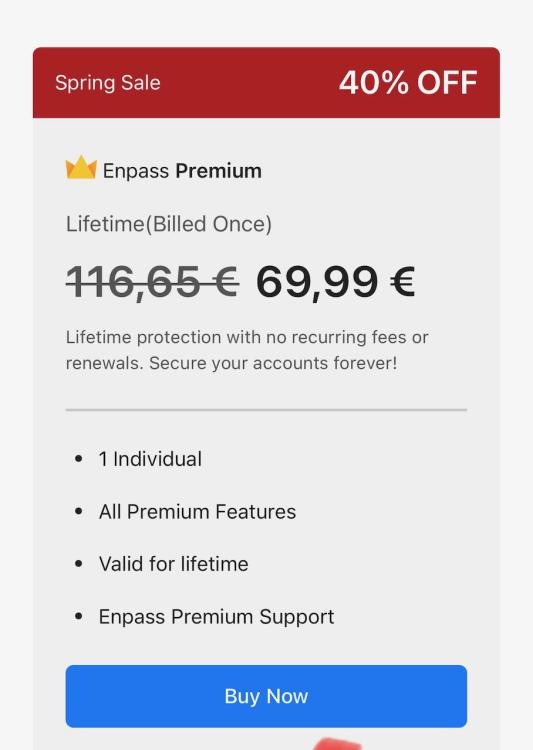
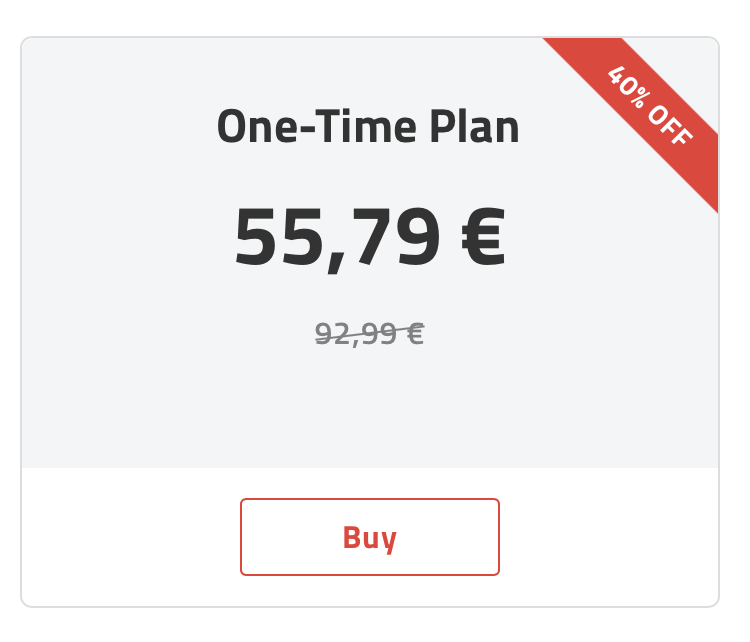
  1. I am also a Lifetime user and can understand the annoyance. There needs to be better communication from Enpass here! I can understand that you want to generate regular income, but upsetting the people who brought you here in the first place is bad. I feel like I'm being taken for a ride here too. I'm a Pro user and the app wants me to pay €70 for a lifetime license. If I go to the homepage, it only costs 56€. I would assume that a loyal existing customer would pay less! I'm disappointed in you!
Account

Navigation

Search

Search

Configure browser push notifications

Chrome (Android)
  1. Tap the lock icon next to the address bar.
  2. Tap Permissions → Notifications.
  3. Adjust your preference.
Chrome (Desktop)
  1. Click the padlock icon in the address bar.
  2. Select Site settings.
  3. Find Notifications and adjust your preference.