OLLI_S
Members
-
Joined
-
Last visited
-
@JasonHK I know that the Enpass Icon is available in the Context Menü, but this requires multiple mouse clicks: Click on "Existing User? Sign In" Right-Click in the field "Username" Click on the entry "Enpass" in the context menu -> the Enpass Assistant window opens Double Click on the target entry in the Enpass Assistant window With the icon in the login fields there are less actions required: Click on "Existing User? Sign In" -> The login fields are automatically filled Even when you have multiple passwords for an entry logging in via the Context Menü is much faster: Click on "Existing User? Sign In" Click on the icon in the login field -> all entries for the URL are shown in a popup menu Select the proper entry So this are less mouse clicks.
-
Hello @Vikram Dabas, for me it is very important to backup my passwords so they have to be stored (synced) with my D:\ drive. OLLI
-
I intensively tested the login with KeePass + Kee in comparison to Enpass. To have an icon in the login-fields is more user-friendly. The login fields are normally on the center of websites, so the fields (and the icon) are in the center of users attention. No long mouse moves required (reaching the Enpass icon requires longer mouse movements than KeePass). Reaching the Enpass toolbar icon also interrupts the flow of logging in (it is disturbing the flow). Kee and KeePass are directly integrated into the flow. I am searching for a better way to log me in. Like such an icon in the login fields. Best would be a faster way that requires less mouse clicks. At login pages automatically show the Enpass assistant window (the window that is shown when you click the toolbar icon in the browser and where you see all logins for the current URL) close to the login fields. So I just need one mouse click to log me in (no key-press or additional mouse click). Currently I need a click on the Enpass Browser Extension and then a double-click on the entry in the Enpass Browser Extension. @Vikram Dabas would you please forward this feature to the developers? I always try to increase the usability of applications. Thank you my friend!
-
@Vikram Dabas How is the status for this feature? We are really very excited to see this in Enpass...
-
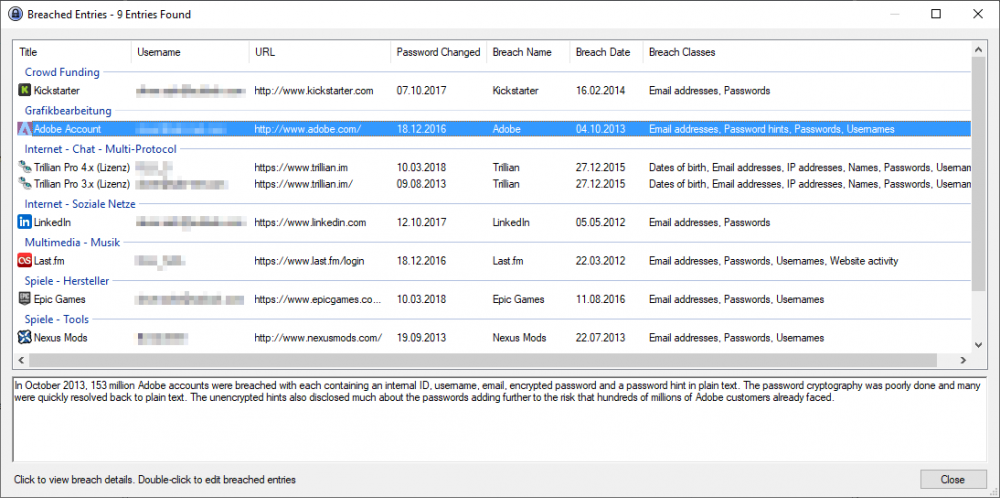
@Vikram Dabas Here is a screenshot of the scan results of the Have I Been Pwned plugin in KeePass. I selected to see all results (default is to see only those results where the password was not changed after the breach) so you see more results. You see that the plugin gets the Password Change Date in KeePass (this is not stored, but he plugin compares the passwords in the history of each entry). It also displays the breach date and at the bottom you get information about the breach. Would be cool if Enpass also offers such a "Check breach by website" feature and also displays information (text) about the breach. Of cause in a larger font. OLLI
-
-
@Vikram Dabas Will this security issue be fixed too? Maybe you implement my suggestion:
-
I see that this is really a security issue! If all keyboards are in the clipboard and can be read there in plain text. The Android-App KeePass2Android uses an own keyboard where I have the buttons Username and Password. This is very secure (no clipboard) but also not very user friendly (I have to select the entry in KeePass2Android first, then switch the keyboard). So I suggest that you clear the password also from the Android clipboard after you pasted it. @Caporeira Do you mean the Android Clipboard (tat is available for all applications)? Or what do you mean by the Edge Clipboard? Best regards OLLI
-
Hello @Vikram Dabas, Cool, then I am keen about the new version... Best regards OLLI
-
-
Hello @Vikram Dabas, I suggested above that Enpass should clear the clipboard only, when the content of the clipboard came from Enpass. Maybe this suggestion is useful for the developers. Best regards OLLI
-
Thank you, @Vikram Dabas
-
Hello @Vikram Dabas, the new Beta Program page is an excellent idea! Thank you for adding this! I think about setting this topic as [Implemented] because you are working on a portable version. Best regards OLLI
-
Thank you, @Vikram Dabas
-
Thank you!