durnoy
Members
-
Joined
-
Last visited
-
Hi @Vinod Kumar, Although what you described about sharing vaults with other people totally makes sense, the use case described first by @chribonn and confirmed by @Toby Osborne and @rgsiiiya is quite different! Specifically, it's about syncing several my own vaults using one my own cloud account. To make a dramatic comparison, imagine that you were allowed to have just one google docs document per google drive account. That would be outstandingly inconvenient. But this is exactly what Enpass 6 does! Sharing vaults and having multiple vaults are orthogonal features. I hope you will sort things out at some point. Thank you.
-
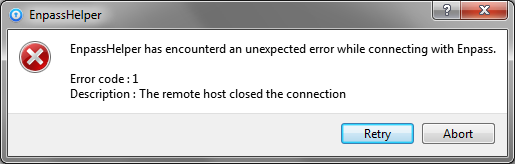
If I exit Enpass (no matter if was locked or unlocked), an error dialog box pops up - attached. After I click on either of the buttons, EnpassHelper.exe process remains in the background. Then if I run Enpass again, a new instance of EnpassHelper is started as expected. Then if I exit Enpass, the same error shows up, and now I have two background EnpassHelper.exe processes. OS: Windows 7 Ultimate x64