


PatrickR
Members
-
Joined
-
Last visited
-
@Abhishek Dewan, apparently, you don't even considering an answer any more. I will make sure to conclude an advisory contract next time before answering your questions. Patrick
-
Hi @Abhishek Dewan, considering your appreciation of my support the least I can ask is for you to read my postings. A patch for the issue will never help me even if it was finished. What I need is a way to fix my corrupt data. Are you willing to help me with that? Patrick
-
@Abhishek Dewan I answered every single question concerning the bug, even the ones that won't contribute to the solution of the problems by your developers. In return for my free contribution to your commercial product which I purchased, you did not only refuse to offer a workaround but in addition chose to completely ignore my postings.
-
As said numerous times. A fix for the problem will help new users and your company. It won't, however, help me. Hence, I would really appreciate a solution (not a workaround) from Enpass to fix my now currupt data.
-
-
As I now invested time to help you solve your import problem: Could you please in return provide a way to fix my now corrupt data without re-importing? Patrick
-
Hi @Abhishek Dewan, I am taking your word for it. The 1Password version is: 1Password 6.8.9 (689000) on macOS Monterey current. Patrick
-
Could you please give an update on the suggestion? It would help me to work around a bug in the 1Password import functionality. Patrick
-
-
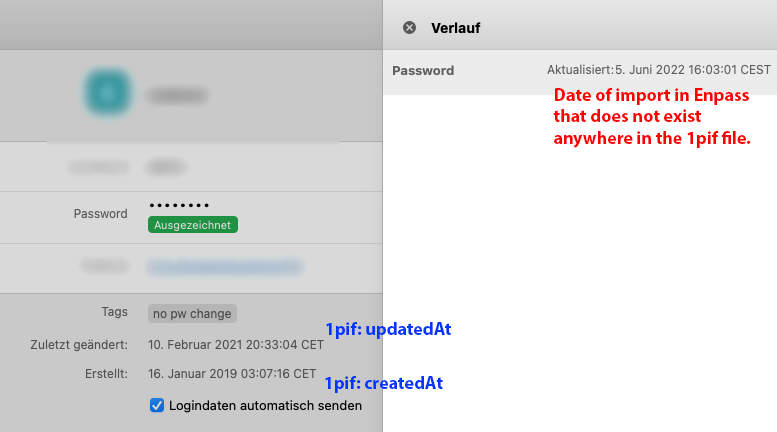
Hi @Abhishek Dewan, I suggest, we skip the suggested step and take a big leap forward. Please see the attached screenshot for reference. This, however, does not solve the problem with my now corrupt data as I don't plan to import again. What is your suggestion to get the correct date in the password changed field without reimporting? Can you provide any means of scripting Enpass? Patrick
-
You are right. According to Enpass, the password was changed yesterday. The reason is that the 1Password import function of Enpass is still broken and sets the password update date to the date of the import rather than the key updatedAt in the 1Pif export. As a result, all 1410 of my passwords will be displayed in the audit section at the exact same date in the future. Patrick
-
The introduction of Quick Unlock by TouchID is a huge step forward for the usability of Enpass. However, in my opinion the promised perfect balance between convenience and security is still unmet due to the lack of a critical part: TouchID timeout. TouchID is not 100% secure as demonstrated by security researchers who were e. g. able to replicate working fingerprints for TouchID. The logical consequence would be to disable TouchID in Enpass completely. However, this would not only eliminate the convenience benefit but also increase the risk of shoulder surfing. The solution is an adjustable timeout deciding whether TouchID will unlock Enpass or if the master password is required. In my previous password manager, I set it to one hour which is the perfect security/convenience tradeoff in my use cases. Patrick Note: I have suggested this security fix in 2017 where @Anshu kumar announced it being part of the next major update. Unfortunately, it still does not seem to be present in the current iOS version: Since the old thread is now locked, I had to create a new one.
-
I recently switched from 1Password to Enpass. The one feature I miss is to create intelligent tags, e. g. tags that are automatically filled using certain criteria, e. g. passwords not changed for over 3 years. Most of my problems could be solved if there was a way to list passwords that haven't been changed for some time. According to the following blog post, this feature seems to exist: https://www.enpass.io/blog/how-to/how-to-audit-your-passwords-in-enpass/ ("They are categorized as – 3+ years old, 1-3 years old, 6-12 months old, 3-6 months old.") Unfortuately, the described items don't exist in my Audit section, just compromised, weak, identical, expired. I am using the current macOS App Store version of Enpass 6.8.1 (1060). Patrick
-
May I assume that the modification time but is now on a high priority? Could you please keep me updated, even after three years, I am still eager to finally switch to Enpass. Patrick
-

