thepisu
Members
-
Joined
-
Last visited
Everything posted by thepisu
-
Hi, any news about the native compatibility between Vivaldi and Enpass for Android?
-
Any news about this? It's an issue in Enpass side, or on Vivaldi side?
-
Hi, it would be good to add in the autofill feature of Enpass for Android, the support for the new Vivaldi browser (still in beta). It currently works, but websites are not recognized, I manually need to search for them in the password store.
-
I'm currently using Enpass 6.0.4 on Ubuntu 18.04 (64 bit), and I found this issue. Steps: select a subtag (es. Customers > Customer 1) click on an item with this tag edit the item save Issue: it loses the subtag selection, and return to "All elements" view. Expected result: after saving the edited item it should stay in the current selected subtag view. This is useful when reviewing and correcting many items inside a subtag.
-
Hi, currently in the "Password check" section of the left panel you can see the "old password", where old means: 1 month 2 months 3 months It can be useful to customize the "old" meaning... 3 months is really a short period for me. For example, I wish to see passwords that I'm not changing for 1 year.
-
Hi, the idea of a keyboard for autofill in Android apps is great (more because in Android 4.4 the notification mode for autofill is not supported), but it's not very handy to change keyboard every time I need to autofill, and the Enpass integrated keyboard cannot substitute a full Keyboard app (with multiple languages, completion, prediction, and so on....). I think you should take into consideration a partnership with a keyboard app developer, in order to integrate Enpass feature in a full Android keyboard (maybe with a "plugin app"). An example should be SwiftKey, a very good keyboard now free to install.
-
I'm a Linux user, and coming from KeePass / KeePass X at work computer. Sometimes I used the "kpcli" client, to access accounts data from a terminal, connecting to my PC using SSH, when I was on a different PC and not wanted to install the full GUI client. It would be enough to have a read-only Enpass CLI client, very simple, only for showing and copying accounts data. Interesting the behaviour of kpcli for showing password: they are printed in red color and red background, so they are not visibile but can be selected and copied. Thank you
-
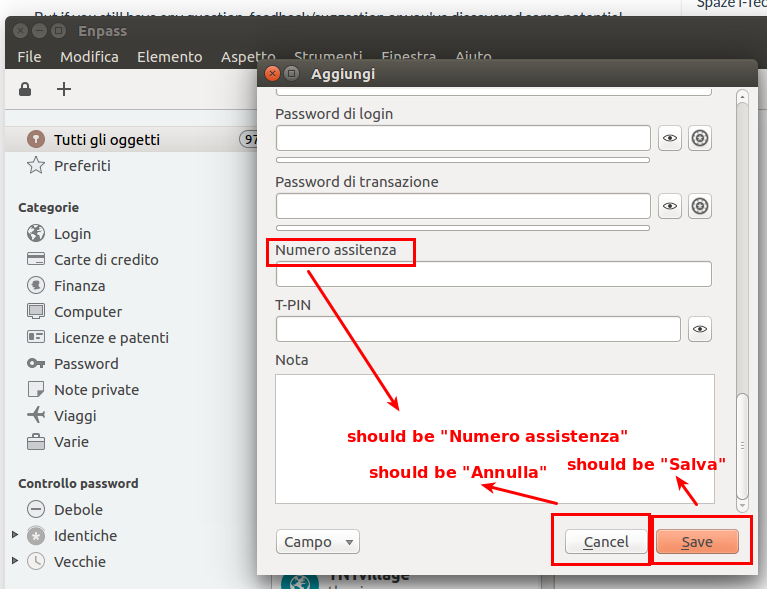
I found 3 issues in Italian Localization (see screenshot) 1. the field name "Numero assitenza" should be "Numero assistenza" 2. "Cancel" and "Save" buttons are not translated Thank you