

Skip to content
View in the app

A better way to browse. Learn more.

Enpass Discussion Forum

A full-screen app on your home screen with push notifications, badges and more.

To install this app on iOS and iPadOS
  1. Tap the Share icon in Safari
  2. Scroll the menu and tap Add to Home Screen.
  3. Tap Add in the top-right corner.
To install this app on Android
  1. Tap the 3-dot menu (⋮) in the top-right corner of the browser.
  2. Tap Add to Home screen or Install app.
  3. Confirm by tapping Install.

Removable

Members
  • Joined

  • Last visited

  1. @Anshu kumar Thanks for your reply. And can I make a suggestion? I recommend adding a "fill form" option, just fill form, but do not commit it. Sometimes I really need this feature, I hope my advice can be adopted. THX!
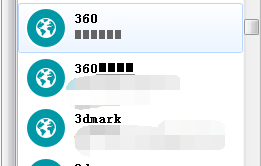
  2. I am a Chinese user, I decided to use enpass yesterday, before that I used the roboform. I export my data to html file from roboform, and import to enpass. But I found all the Chinese characters are garbled, just like black squares. It caused me inconvenience,so I hope developers can fix this bug. THX!
Account

Navigation

Search

Search

Configure browser push notifications

Chrome (Android)
  1. Tap the lock icon next to the address bar.
  2. Tap Permissions → Notifications.
  3. Adjust your preference.
Chrome (Desktop)
  1. Click the padlock icon in the address bar.
  2. Select Site settings.
  3. Find Notifications and adjust your preference.