


Max Weißböck
Members
-
Joined
-
Last visited
-
Either I'm really dumb or the Feature is missing at all I created a new catageory E-Mail (why is it not here by default? everyone has an E-Mail) but I see no way to give a Template to this category. Where is it???? Second question, in my attempts to fix above problem, I also made a two copies of the existing E-Mail Template But I found no way to delete them again! Please help, this is my third attempt to switch from mSecure to Enpass, but every time I'm getting frustrated more and more...
-
The only way to go seems to doit manually. I found no other way.
-
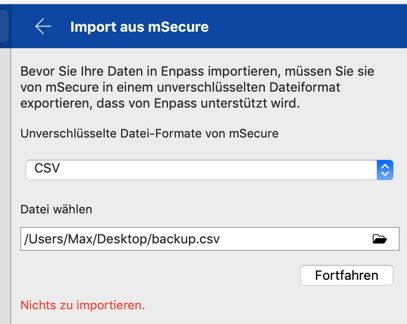
I'm using macOS 10.14.5 on a 15" MacBook Pro, German Language Enpass Version: 6.1.0 (390), default language (so that is German) mSecure Version: Version 3.5.7, default language (so that is German) And that is the error I'm getting on mSecure Import, saying "Nothing to Import" The cvs File contains more than 800 records, here are the first 5 or so, @@@@ stands for emai, xxxx for password mSecure CSV export file Persönlich,Web-Anmeldungen,ali express,,aliexpress.com,@@@@@@,xxxxx, Nicht zugeordnet,Web-Anmeldungen,Amazon,,,,xxxxx, Persönlich,Web-Anmeldungen,Apple-ID für App Store und ITunes Max,yyyyyyyyyyyy,,@@@@@@@,xxxxx, Geschäftlich,Web-Anmeldungen,Atlassian Account,text text texttext text text,,@@@@@@@,xxxxxxx, Persönlich,Nicht zugeordnet,@@@@,,XXXXX,,,,,,
-
Just did a little search in the forum. I't seems msecure import never did work, or are there any user thad did a successful migration from msecure to enpass?
-
This msecure import still does not work! Why not? I just bought the pro update as I want to migrate and use fingerprint I'm using version 6.1.0 (390) I'm getting this f...g error: Nichts zu importieren. Fix this ASAP or give me my money back! I can not manually migrate more than 830 Password records!
