

Skip to content
View in the app

A better way to browse. Learn more.

Enpass Discussion Forum

A full-screen app on your home screen with push notifications, badges and more.

To install this app on iOS and iPadOS
  1. Tap the Share icon in Safari
  2. Scroll the menu and tap Add to Home Screen.
  3. Tap Add in the top-right corner.
To install this app on Android
  1. Tap the 3-dot menu (⋮) in the top-right corner of the browser.
  2. Tap Add to Home screen or Install app.
  3. Confirm by tapping Install.

Lince

Members
  • Joined

  • Last visited

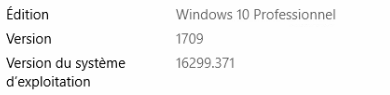
  1. Ok, here's the infos (attached files) :)
  2. Hi @Enpass team I'm facing kind of a problem.... Enpass 5.6.8 get removed by Antivirus (Avast Free) and get positive on virustotal..... Or also https://www.virustotal.com/fr/file/7d7fc9aa37bc37765d2ed7dcd75c9787d74317941a59aca84ddbcd2126492b4d/analysis/

  3. Lince replied to Bibon's topic in Android
    @Akash Vyas Hi ! I would also prefer the solution of an extension. I'm already using a multi-language keyboard (fr/en/cn) and it would be a hassle to have to alternate between 2 keyboards. @Anshu kumar Said there would be a search about an alternative method in 2016 but there is currently still nothing supporting Firefox Android Except Keyboard. Would the Dev/Adaptation of one more Extension cost this much efforts (You have already five to maintain) ? Sources: https://www.enpass.io/enpass-browser-extension/ Bye !

Account

Navigation

Search

Search

Configure browser push notifications

Chrome (Android)
  1. Tap the lock icon next to the address bar.
  2. Tap Permissions → Notifications.
  3. Adjust your preference.
Chrome (Desktop)
  1. Click the padlock icon in the address bar.
  2. Select Site settings.
  3. Find Notifications and adjust your preference.