


Jim
Members
-
Joined
-
Last visited
-
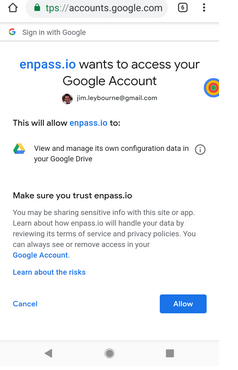
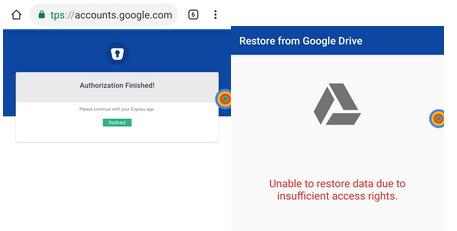
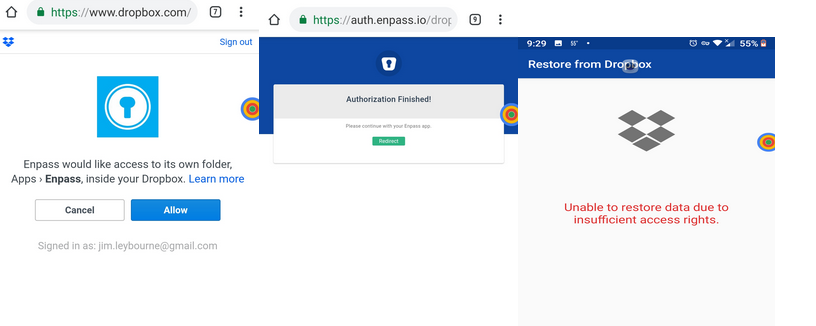
Thanks... I was using Brave - now set to Chrome, same issues: Android is Nokia 6.1 (2018) TA-1045, running Android 9. Backup files exist on both Google and Dropbox in Apps/Enpass. When I attempt to sync with Google I click "Allow" in the first screenshot, then I get Authorization finished, then back to the first screenshot. The same thing happens with Dropbox:
-
Not sure you got my reply - it went to discussion@enpass.io via email. Should I post here?
-
I purchased Enpass quite some time ago. I have never been successful in getting it to work seamlessly across my machines - and most importantly my Android. So I have kind of limped along, occasionally spending a couple of hours trying to get things to work, then quitting in frustration. Some issues have been getting sync to work with google drive from my Android (Nokia 6.1), getting the desktop version to use the same sync file as the android...in short, I'm pretty disappointed and fed up with fighting Enpass. Plus, I used the beta for a while - don't know if that caused any further complications. The issue I'm facing right now is - after removing Enpass completely from my android, then reinstalling, and authenticating successfully with Dropbox, I'm redirected to Enpass which tells me that it couldn't authenticate. This seems to happen when I try to use Google as well. The specific error for Dropbox is "Unable to restore data due to insufficient access rights" - but I'm clearly logged into Dropbox. I am thinking I should uninstall my desktop version on all pc's and uninstall all versions on the phone. Which desktop version should I use to reinstall x64 or Win 10? I assume I should also use the latest Android version (but not beta)? I'm aware I sound like I'm a complete idiot here, but I'm too frustrated to care. :-) Any assistance would be appreciated.
-
Thank you. That is one of my favorite features of other managers.
-
New user. I can't figure out how to use Enpass to fill out forms like, for instance, my shipping information. Am I missing something, or is this not an option? Thanks.