

Skip to content
View in the app

A better way to browse. Learn more.

Enpass Discussion Forum

A full-screen app on your home screen with push notifications, badges and more.

To install this app on iOS and iPadOS
  1. Tap the Share icon in Safari
  2. Scroll the menu and tap Add to Home Screen.
  3. Tap Add in the top-right corner.
To install this app on Android
  1. Tap the 3-dot menu (⋮) in the top-right corner of the browser.
  2. Tap Add to Home screen or Install app.
  3. Confirm by tapping Install.

Kamute

Members
  • Joined

  • Last visited

  1. I am aware. I think Enpass should at least notify users that they are aware of the issue and they are working on a fix.
  2. Unfortunately, Enpass does not seem to really care about their users and it's frustrating. It has been several days now since I added to this thread and reported the same issue and no one has replied yet. It sucks.
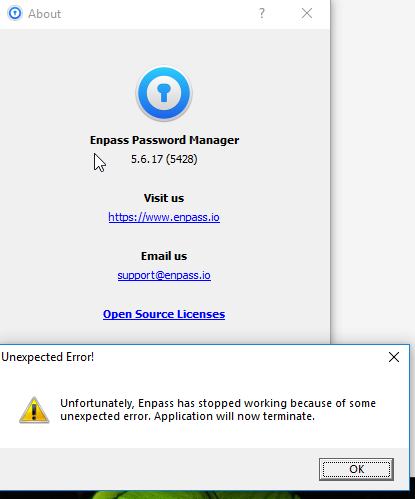
  3. I keep getting this error as well- and often! I am using Enpass version 5.6.17 (5428) on Windows 10. Did anyone find a fix for this? I have attached the error I keep receiving this error while running Enpass. Users and developers of Enpass, please advise. Thanks.
  4. Thank you for responding, @Anshu kumar
  5. Can someone confirm if Enpass will be doing a security audit? If there will be no security audit, I will be leaving Enpass like@Gili and I will use a different password manager. The responsiveness of the staff tells me that security is not a really a top priority to Enpass (maybe a priority, but not a top priority).
Account

Navigation

Search

Search

Configure browser push notifications

Chrome (Android)
  1. Tap the lock icon next to the address bar.
  2. Tap Permissions → Notifications.
  3. Adjust your preference.
Chrome (Desktop)
  1. Click the padlock icon in the address bar.
  2. Select Site settings.
  3. Find Notifications and adjust your preference.