

Skip to content
View in the app

A better way to browse. Learn more.

Enpass Discussion Forum

A full-screen app on your home screen with push notifications, badges and more.

To install this app on iOS and iPadOS
  1. Tap the Share icon in Safari
  2. Scroll the menu and tap Add to Home Screen.
  3. Tap Add in the top-right corner.
To install this app on Android
  1. Tap the 3-dot menu (⋮) in the top-right corner of the browser.
  2. Tap Add to Home screen or Install app.
  3. Confirm by tapping Install.

ostaehr

Members
  • Joined

  • Last visited

Everything posted by ostaehr

  1. Can someone please look into this?
  2. Still no luck with Enpass on this computer. Others work fine. Frustrating, because I have the premium version and cannot use the features here. Now as a workaround I have to use the free Desktop W32 version. Are there any folders or registry keys I could delete after uninstalling the store version?
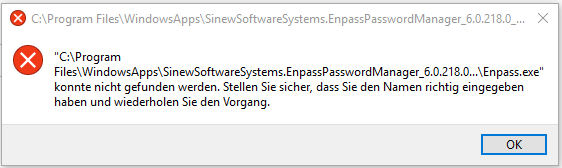
  3. Hi, when I try to run Enpass 6 (installed from Windows Store) I get en error: Basically it is saying "file not found". But I can confirm the file exists and effective access rights for my user account are Full Access. Windows 10 Home, Version 1809 and latest patches as of today. No Antivirus other then Windows Defender. I tried to set some other NTFS access rights, repaired and reinstalled the app, nothing helps. Any ideas? Kind regards, Oliver
Account

Navigation

Search

Search

Configure browser push notifications

Chrome (Android)
  1. Tap the lock icon next to the address bar.
  2. Tap Permissions → Notifications.
  3. Adjust your preference.
Chrome (Desktop)
  1. Click the padlock icon in the address bar.
  2. Select Site settings.
  3. Find Notifications and adjust your preference.