

Skip to content
View in the app

A better way to browse. Learn more.

Enpass Discussion Forum

A full-screen app on your home screen with push notifications, badges and more.

To install this app on iOS and iPadOS
  1. Tap the Share icon in Safari
  2. Scroll the menu and tap Add to Home Screen.
  3. Tap Add in the top-right corner.
To install this app on Android
  1. Tap the 3-dot menu (⋮) in the top-right corner of the browser.
  2. Tap Add to Home screen or Install app.
  3. Confirm by tapping Install.

Multi

Members
  • Joined

  • Last visited

  1. Hello @Pratyush Sharma, I am on the latest Android version of Enpass (6.5.0.390). The problem exists for atleast 1 year. I was thinking about reporting the problem but never really felt the need.
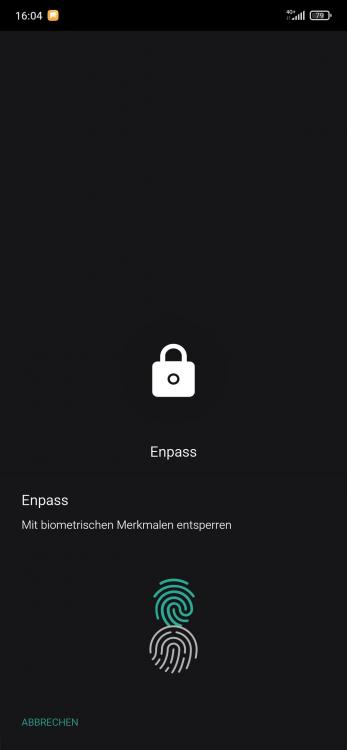
  2. Hello guys, there is something which bothers me for a while already. I am using a Mi 9T which has In-Diplay fingerprint reader. Everyhting is working but there is an icon shown where the fingerprint reader should be but in real it's in a different position. The green on is from Enpass and the white one is from my phone. I guess it's not possible to adjust the position of the fingerprint icon on every devices and every resolution etc. But would it be possible to completely remove the icon as I already get one from my phone? Would be awesome to have an option in settings. Thanks in advance!
  3. Yeah, I know. I tried googling where to find that ID. But I couldn't find anything realted to the Microsoft Store ID.
  4. You can use the app from Store. You will need to pay for the premium upgrade. After upgrading to premium you can use the Windows Hello (incl. fingerprint and face unlock).
  5. Where do I find my Store ID? Already asked Google but it doesn't want to let me know :(

Account

Navigation

Search

Search

Configure browser push notifications

Chrome (Android)
  1. Tap the lock icon next to the address bar.
  2. Tap Permissions → Notifications.
  3. Adjust your preference.
Chrome (Desktop)
  1. Click the padlock icon in the address bar.
  2. Select Site settings.
  3. Find Notifications and adjust your preference.