

Skip to content
View in the app

A better way to browse. Learn more.

Enpass Discussion Forum

A full-screen app on your home screen with push notifications, badges and more.

To install this app on iOS and iPadOS
  1. Tap the Share icon in Safari
  2. Scroll the menu and tap Add to Home Screen.
  3. Tap Add in the top-right corner.
To install this app on Android
  1. Tap the 3-dot menu (⋮) in the top-right corner of the browser.
  2. Tap Add to Home screen or Install app.
  3. Confirm by tapping Install.

jusy39

Members
  • Joined

  • Last visited

Everything posted by jusy39

  1. jusy39 replied to MPeter's topic in Windows
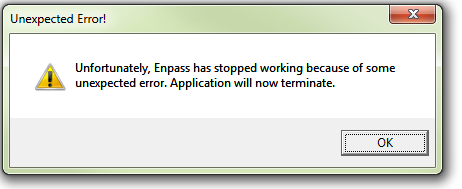
    There's no crash report. Enpass is crashing with only a small dialog box...
  2. jusy39 replied to MPeter's topic in Windows
    Exactly the same here. The Enpass team seems to be overloaded by it's silly decision for a hard migration without fallback/delaying. I destroyed my installation on a business PC. Even after purging all I could find from the Enpass installation (files, registry, database) v6 doesn't start at all (just crashes). v5 was working but the browser plugin doesn't cooperate (even the old one I stored by myself: it doesn't connect to the running v5-main application). So my PC is unable to run Enpass v6 at all after upgrade. edit: v5 now is also broken. Think, I broke it when I switched between v6 and v5 too often... Perfect time to change to another program. Did you get it working?

Account

Navigation

Search

Search

Configure browser push notifications

Chrome (Android)
  1. Tap the lock icon next to the address bar.
  2. Tap Permissions → Notifications.
  3. Adjust your preference.
Chrome (Desktop)
  1. Click the padlock icon in the address bar.
  2. Select Site settings.
  3. Find Notifications and adjust your preference.