SvenS
Members
-
Joined
-
Last visited
-
I just had this message on my tablet, which i am using, but not Enpass so much. I got Email, i type in code and and then its just spinning: is loading (german Wird geladen) please wait. there was also a short pop up from enpass: authentication successful. But just spinning... Tried now multiple times, just not working. On Windows, and Phone its working. :-(
-
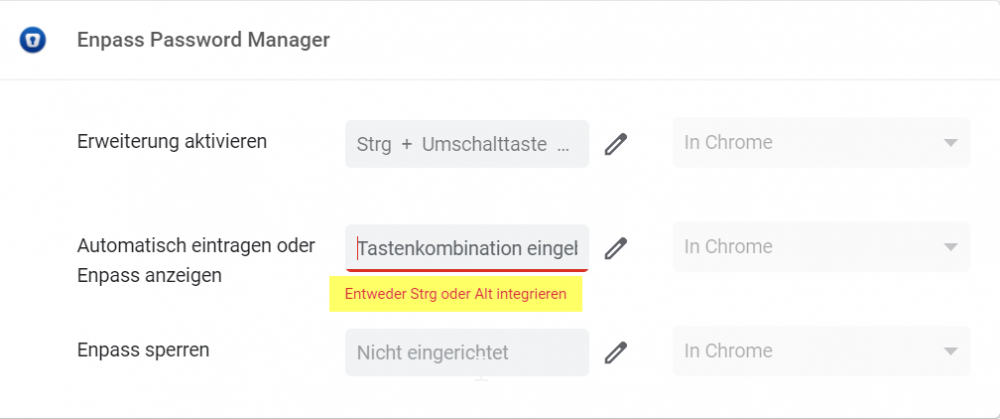
Hi, thanks for the answer. I checked the manual, but the problem is like shown in the picture: For automatic fill in i have to choose Strg OR Alt, but i had before Strg + Alt + A. So is this a bug or why its not working anymore? ps: Strg equals Ctrl
-
Hi, maybe i am confused, but there was an update last week for the chrome extension on my windows 10 machine, and since then i cant use Strg+Alt+A anymore. Only to open the Enpass app. In the chrome extension i only can use Strg (Ctrl for english keyboard) OR Alt, but not both. Why was this changed? br, Sven
-
Hi, I have the same problem with Microsoft account. Was working once and then I had to change password and since then it's not working anymore. If I copy PW from enpass app it's working, with autofill it's saying: wrong password. Any ideas? Br Sven