Larryshin
Members
-
Joined
-
Last visited
-
I also have 1password ( Version 4.6.2 , Windows desktop, default language English )
-
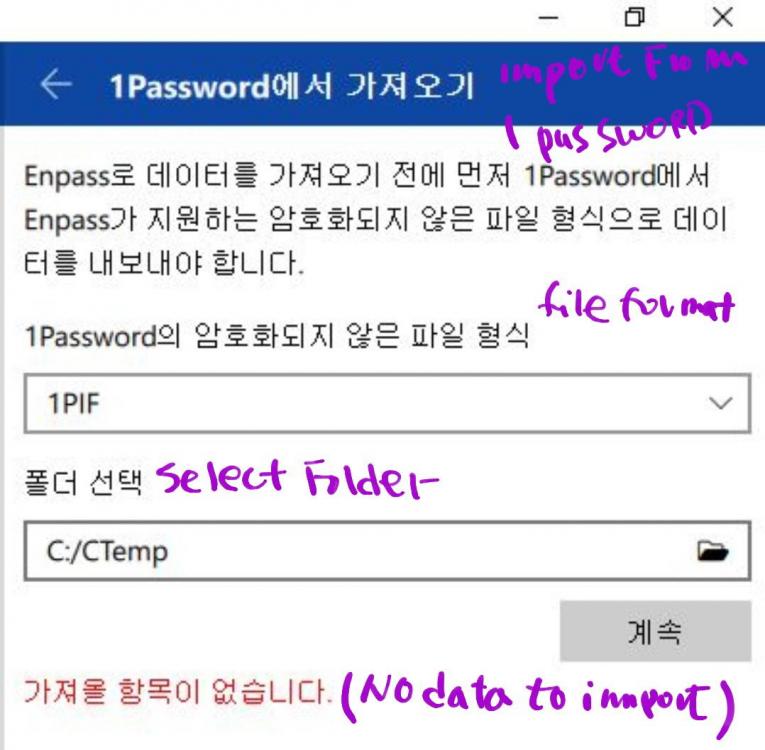
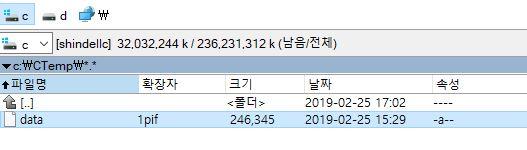
Hope all the enpass people have great 2019 YEAR !!! My Problem : Data import failure from 1password Devices & Apps Windows 10 PC - enpass free version installed iPhone 6 Plus - enpass premium 6.0.4 Version ( yesterday purchased) Gallexy 9 Notes - enpass premium 6.0.4 Version ( yesterday purchased) I've used 1passoword with WIndows Platform & iOS iphone till now. I felt it's time to change from 1password to enpass & I purchased iOS & Android version for it. (1) With the guidance of user manual, in 1Password (in Windows PC) , I exported 1password data in 1pif format. to c:\CTEMP > data.1pif (as in image) (2) Then in enpass ( at the same windows PC ) file - import - 1 password ..1pif format - Select the folder - but enpass could not find the file & " NO Data to import " message shown ( as in image) Please understand that my translation could be slightly different from English as it's Korean version. MY QUESTION 1. Import function only works on Premium Windows Version, not in free version ? 2. If NO, would you guide me to right way ? Thank you in advance