fuehrm
Members
-
Joined
-
Last visited
Everything posted by fuehrm
-
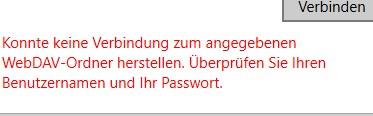
Hello, I have a problem with WebDAV. I have set up my Synology NAS for WebDav. If I call the URL for Webdav internally or externally with the browser, then the login mask comes and I can log in and access the folder. For example, https: // dyndnsname: port / enpass or https: // intern-ip: port / enpass I have installed a certificate which is also valid in the browser. So the user has the required permissions. Now I have enpass installed from the Windows Store, assigned master password and wanted to set up a synchronization via WebDAV. I get the following error as in the screenshot. Likewise, I have an Android smartphone, there is the same problem. At the release of the ports, it can not be, otherwise I would not come from external to the URL. Does anyone have an idea what else could be wrong?