Skip to content
View in the app

A better way to browse. Learn more.

Enpass Discussion Forum

A full-screen app on your home screen with push notifications, badges and more.

To install this app on iOS and iPadOS
  1. Tap the Share icon in Safari
  2. Scroll the menu and tap Add to Home Screen.
  3. Tap Add in the top-right corner.
To install this app on Android
  1. Tap the 3-dot menu (⋮) in the top-right corner of the browser.
  2. Tap Add to Home screen or Install app.
  3. Confirm by tapping Install.

Jones1024

Members
  • Joined

  • Last visited

  1. Hello, Has this any consequences to the security? Do you have to build in any backdoors?
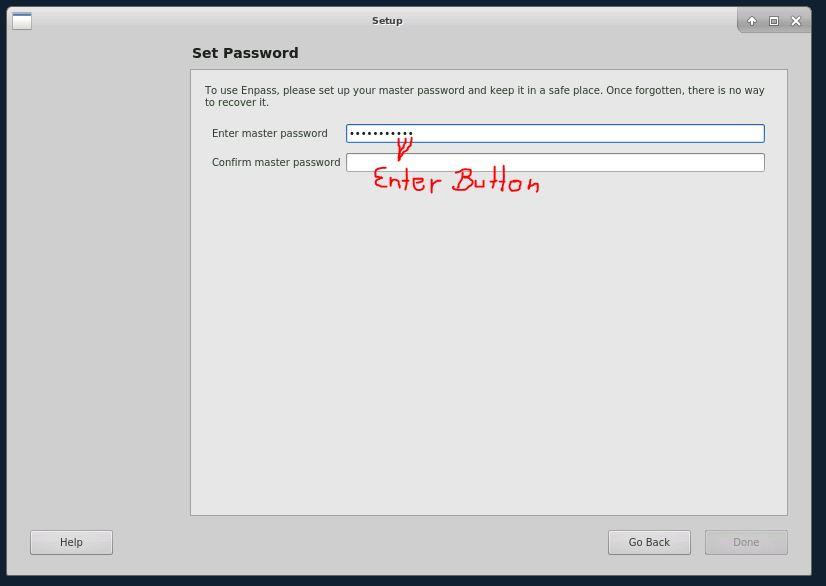
  2. Hello, I installed Enpass on Ubuntu 18.04 LTE xfce4. In Setup-process it´s not possible to input password because the keyboard layout is not german (Enter != Enter, and special-characters interchanged). But system-wide german keyboard-layout is enabled. In all other apps keyboard-layout works (Enter = Enter, and special-characters works).
  3. Can you say anything about these security issues and my enpass wallet? KR
  4. Can you split a large (attachment)Database in many file-parts? Then you have to sync only a small part. Additional you have to register every File and its md5 checksum in a central register-file. When a file is changed, you can dowload the DB-filepart and exchange/remove this file....
  5. Hi, can you implement a checkbox in all clients: CHECK - sync attachment, UNCHECK - no sync attachments especially on mobile clients this will be helpfull to save data-traffic (on mobile clients i don´t need any attachments)

Account

Navigation

Search

Search

Configure browser push notifications

Chrome (Android)
  1. Tap the lock icon next to the address bar.
  2. Tap Permissions → Notifications.
  3. Adjust your preference.
Chrome (Desktop)
  1. Click the padlock icon in the address bar.
  2. Select Site settings.
  3. Find Notifications and adjust your preference.