Simon92
Members
-
Joined
-
Last visited
-
Hi @Anshu kumar, The fix worked, thanks for that but it seems that with the issue is back again I have 6.1.2 (497)
-
@Anshu kumar any update on this bug so far?
-
@Anshu kumar My details are (if it helps): OS: 10.14.1 Extension Enpass for Chrome: 6.0.2 Enpass app: 6.1.0 (431) Beta Macbook screen: 15,4-inch (2880 x 1800) Dell screen: 25-inch (2560 x 1440) If I toggle between screens without restarting the Enpass app the whole thing does not seem to adjust to the screen.
-
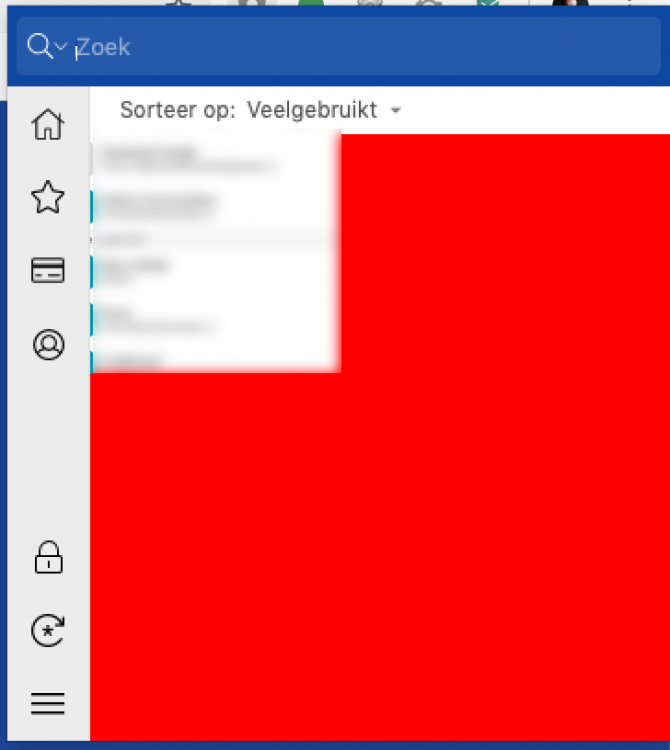
Hi Anshu, Thanks for your reply. The beta did not fix the problem, unfortunately (see attachment, and yes it's red ... not photoshopped). If I switch back to the screen without rebooting Enpass it still works.
-
Simon92 joined the community
-
Guys, I have a weird bug when switching screens. I do this a lot because I work at a company with sometimes a meeting. When I hook or unhook, the resolution is incorrect and Enpass does not work properly anymore https://www.dropbox.com/s/qb8hx8oa71ycvpv/Schermafbeelding 2019-05-20 om 16.54.03.png?dl=0 Currently, I solve it with simply rebooting Enpass, which works but its quite annoying to do it every day 6 times.