user3458
Members
-
Joined
-
Last visited
-
Please make more use of the Favourites feature. Having Favourites shown on top in browser extensions where you have multiple accounts has been suggested but not implemented yet. Since those topics are older and closed, I want to bring it up again.
-
Hi @Pratyush Sharma, you find that video here: https://gofile.io/?c=gdDBCD
-
@Pratyush Sharma This behavior is what I suggest to change.
-
Yeah, there should just be an edit action for WebDAV where you can edit URL, username, and password fields. I have moved around my folders quite some times and I ended up recreating WebDAV connections for six vaults every time, times 2 (on mobile as well).
-
Tip: If you don't want both Chrome and Enpass asking you wether you want to save passwords, you can disable Chrome asking in Chrome Settings -> AutoFill -> Passwords.
-
-
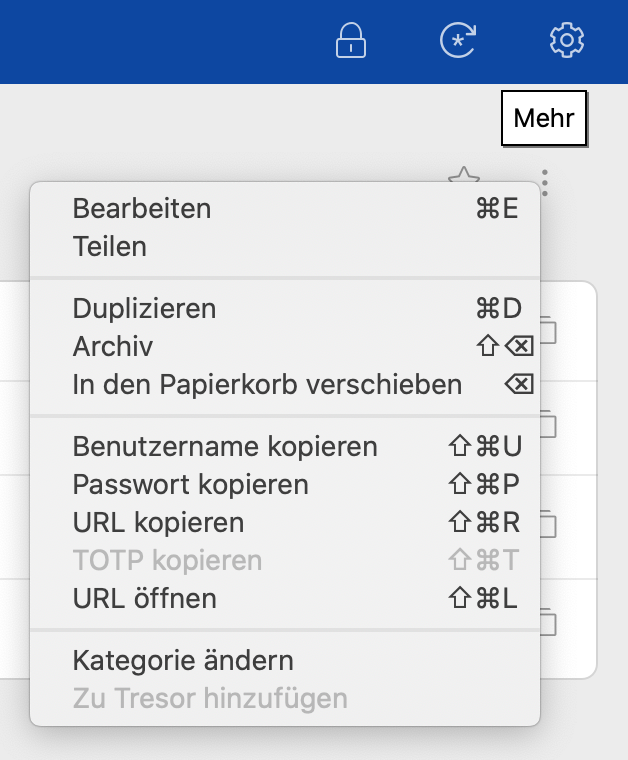
You could implement drag and drop to move/copy (multiple) entries so when you drag one or more from the list onto the "vault selector button" (see image "Alle Tresore"), it opens like when clicked on, and then you drop them on a vault.
-
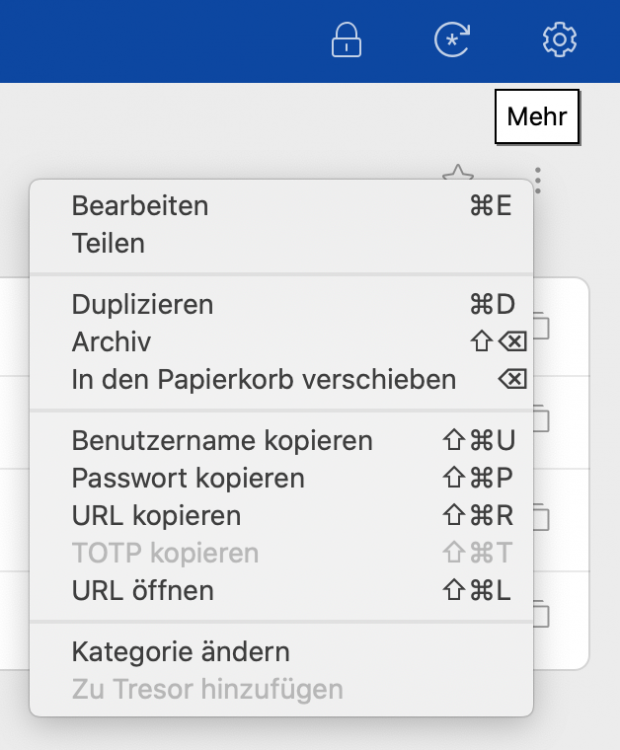
If you have all vaults in Enpass selected, you currently cannot move or copy entries to other vaults (see disabled option in context menu "Zu Tresor hinzufügen"). If you have selected a single vault instead, you can move or copy to other vaults. This is something with low priority I guess, but may be changed quickly. Both technically and for usability, I don't see a reason for why this currently is as it is.

-
@Kashish, thank you for that. Indeed, auto fill is a crucial feature. And I'm wondering why there still are apparently the same issues as years ago. Can you tell any progress in fixing it yet? As you can imagine, I don't wanna wait long time more for a fix. If I can assist further, poke me, I'm in.
-
Hi Kashish, I reinstalled the app some times, nothing changed. Autofill doesn't work on any website for me in Chrome. Just installed the extension for Firefox. Autofill and auto login both work for google.com, but not for amazon.com (only autofill here). So Firefox at least does something. In Chrome, I have only TOTP copying working always, autofill (and auto login afterwards) never. Auto login after manual fill via Enpass Chrome extension works.
-
user3458 joined the community
-
This is SO annoying. Is there any progress just yet? Using Chrome 79.0 on macOS 10.15.2, Enpass 6.3.3, Chrome Enpass extension 6.2.1. Auto login, auto copy TOTP, and autofill all are enabled. No autofill happening ever, auto login and copying TOTP work fine after manual login. Just... fix this... make it work... please. It's SO annoying.