


Kashish
Members
-
Joined
-
Dear users, We understand and relate to your issues by reading your reactions. However, we're here to shed some light on how we aim to handle Pro users now and in future. As promised, the existing Pro users will continue to enjoy all the Pro features without any additional cost. We will keep on polishing the app with new updates. Furthermore, we will continue to add more Pro features in future at no extra cost. However, with time we have to release features that make Enpass better, with added security and productivity which requires recurring operational costs. Hence these overheads are difficult to cover from a one-off cost of Pro-license, and that is why we need monetary inputs from users at a minimal cost. With that said, rest assured, Pro users are not compelled to pay once again for Premium features and can continue to enjoy Enpass Pro along with new Pro features. Thanks.
-
@KHK Make sure that you save the username in the correct field type (as Username) in Enpass. Just create a login entry in Enpass with the username, password and the URL of the particular site.
-
@insigma Glad to know that the sync is working now. Thanks for your feedback.
-
@insigma Make sure that the URL you are using in Enpass is in the required format : https://{host}/{path}/remote.php/dav/files/{username} You could PM me the demo account credentials if you still face an error with the above configuration. Also, let us know the Enpass version and the OS you are using.
-
@winfield Thanks for the reply. On which device are you facing this issue? And, did you face this issue after a recent update of Enpass? Share the Enpass version you are using presently.
-
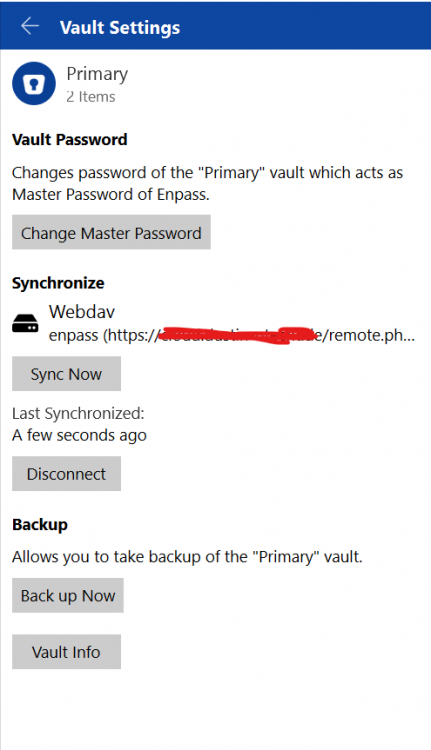
@False Thanks for sharing the WebDAV account details. We connected using the WebDAV Nextcloud server with the demo account credentials you shared, and there was no error. We are, however, using Enpass version 6.4.2 on Windows. We have intentionally masked the WebDAV URL for privacy reasons. However, we have shared the unedited image and the account details with you over the ticket.
-
@aa11 We understand it's been long, however, we will try our best to have this feature in our upcoming versions.
-
@akash8 Welcome to the Enpass forums. Enpass requires a master password if the user is setting up sync with a cloud account where there is an existing Enpass data. However, in case if you lose or forget the master password, it is impossible to setup sync with the same cloud account. Now, as you have access to the data on the Android device, you can manually share each item from Enpass in Android with Enpass on the desktop. You will have to setup a new primary vault on the desktop and then add each shared item into the vault. Please refer the user guide here for info on sharing items in Enpass.
-
@Just a guy We can understand that it is indeed hard to identify the particular OneDrive account with which you are syncing in Enpass. However, one workaround is to change the default browser on your system and then setup sync. This will ensure that you do not have saved OneDrive account credentials in the browser and can sync with the desired account credentials when redirected to the browser.
-
We tried earlier as well as today with the demo account credentials that @Alexxander sent us and the sync is working perfectly fine. We didn't come across any error with the sync. Meanwhile, if @False could share the demo account with us, we'll look into any problem there might be with the WebDAV sync.
-
@Captain_Eric Thanks for sharing the websites. Our team is now looking into this. We will keep you posted on the updates.
-
-
@Yoshie2000 Welcome to Enpass forums! Disconnect the sync in Enpass on all the devices. Make sure not to delete data from OneDrive account while disconnecting the sync. Once you disconnect the sync, delete all permissions for Enpass from the same OneDrive account after opening the page. Now, re-connect the sync on all devices and check if the problem resolves. If the issue persists, share the Enpass version you are using on each device.
-
@bestpika Thanks for highlighting this. We have been able to reproduce the problem at our end. A fix for the bug will be available in the future updates.
-
@Sujithkumar You will either have to disable Sophos Anti-virus in order to let the extension communicate with Enpass app or bypass the localhost connection following the steps mentioned in the help article here. Let us know if this helps in solving the problem.



