Miraculix
Members
-
Joined
-
Last visited
-
Sorry, there were misleading pictures. See Aufnahme1 before authenticating on server, Aufnahme3 after authenticating. Aufnahme 2 waiting for authentication on server. The expected behavior is, just after starting up the server password synchronisation should work. Aufnahme 1 Aufnahme 2 Aufnahme 3 Kind regads Peter
-
Hello Abhishek, My app-version on Android is 6.7.1.572 and on Windows 6.7.4 (934). On Android I can't create a screenshot, on Windows see Aufnahme1. As long as Enpass is not authorized (Aufnahme 2) on the server this behavior persists. After authorization of enpass on the server all works fine. See next message Kind regards Peter
-
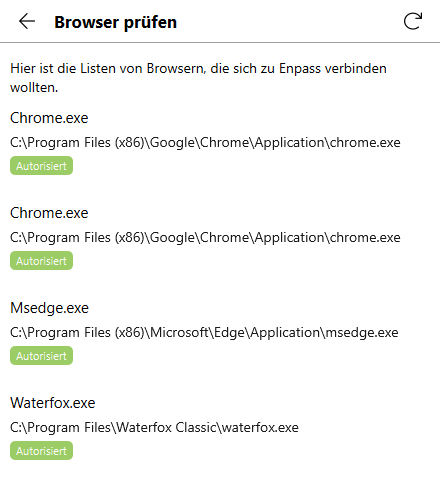
Hi Manish, I'm still using version 6.6.0. From the attached screenshot you can see, Waterfox classic is authorized. Your downloading page still shows extension version 6.7.0 for Firefox, which of course I'll use, since Waterfox and Waterfox Classic are Firefox derivates. Regardsless where the "Enpass icon" is shown, Toolbar or Add Ons, the reaction on mouse click is empty, if I use version 6.7.0 of the extension. I would suggest, that you download the latest version of Waterfox Classic to get my problem regged. Kind regards Peter
-
Sorry for my delay, ad 1) No!!!! That's the main problem. In the meantime a had a workaround; using version 6.6.0 of the extension gave me back the desired functionality. ad 2) Yes, my desktop app is at version 6.7.4. ad 3) "Authorized browsers with verified signatures only" is disabled. ad 4) Followed the steps in the manual. I can see the extension in the toolbar. Clicking on it nothing happens. Reagardless, if Windows 10 or Windows 11.
-
After starting up the "Windows Enpass Server" other clients are not updated until Enpass on the server is authenticated.
-
Miraculix changed their profile photo
-
Dear Ladies and Gentlemen After updating to version 6.7.0 the enpass extension button doesn't work anymore. Installing version 6.6.0 from file solved the problem. Version 6.7.0 should be corrected. Kind regards Peter