


Rafa
Members
-
Joined
Everything posted by Rafa
-
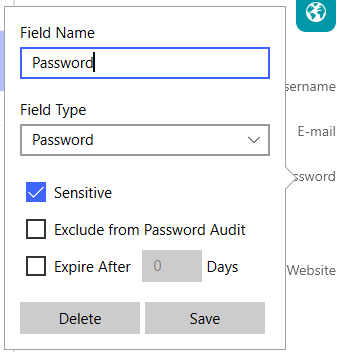
Hi Dani I think a similar feature already exists. Edit a entry in your vault and click on the label of the password. There is a checkbox which says "Exclude from Password Audit". Is this what you were looking for?
-
-
Adding a second existing vault to Enpass from the cloud is a pain, especially on mobile devices. One has to insert the cloud credentials, the cloud url, and the vault password. However, I normally have all this info in one item of my primary enpass vault. I envision a feature where I can select an item within enpass and setup a second vault from this item. Process: Settings > Vault > New > From existing item > Match elements of items, select cloud provider > Finished This would also simplify the process of sharing a vault with someone else: Create a pre-shared key and send via secure channel Send encrypted enpass item containing cloud credentials and vault password Import enpass item and decrypt with pre-shared key (only insert one password) Select item and setup vault from cloud sync I am looking forward to your reply. Regards, Rafa
-
Hi Enpass Team I really appreciate Enpass and use the app on all my devices. The auto fill function is the most important for me, because I often use Enpass for web logins. On my smartphone (Nokia 7 Plus) I often have problems with this functionality. On many websites the same information is inserted int the password input field as the username field. This is very tedious, because copying passwords manually on smartphones is cumbersome. Additionally I wish that TOTP is also entered by auto fill.

