
Skydexter
Members
-
Joined
-
Last visited
Everything posted by Skydexter
-
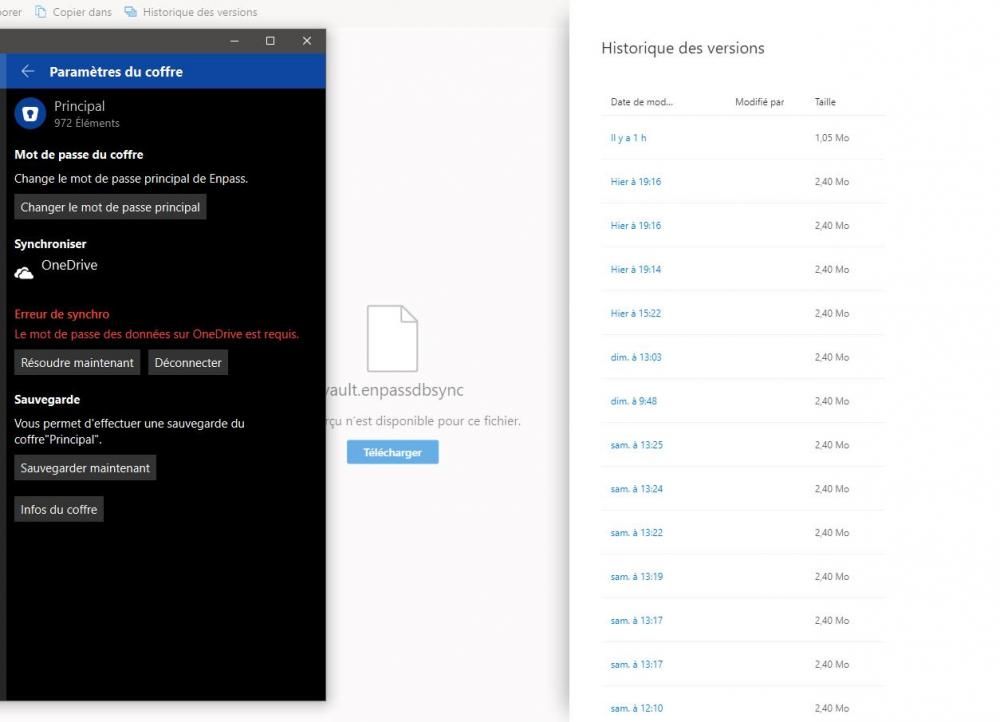
Just got this issue (again). It seems that the problem comes from a corrupted file on Onedrive. (File size change from 2.4mo to 1.05mo in my case) Restoring it to previous version and it worked Screenshot of my Enpass error + Onedrive file history :
-
Done. Had to wait 2 days to get this sync error again. Where can i send my Logs ? Mail ?
-
I have the same problem. Devices : PC (Windows 10 May 2020) - Enpass Version : 6.41.642.0 Phone (Android 9.1) - Enpass Version : 6.4.2.337 Ipad Mini (9.3.5) - Enpass Version : 6.4.2 Every devices have Date & Time set on automatic (and are indeed on the same date & time) When i first encountered this issue i already disconnected Sync on all devices, then deleted Enpass folder on OneDrive. Then re-Synced on all devices with the same vault password just fine... It worked for 2 days it seems, and now i have the same error again : Sync Error - Password of data on Onedrive is required.