

Skip to content
View in the app

A better way to browse. Learn more.

Enpass Discussion Forum

A full-screen app on your home screen with push notifications, badges and more.

To install this app on iOS and iPadOS
  1. Tap the Share icon in Safari
  2. Scroll the menu and tap Add to Home Screen.
  3. Tap Add in the top-right corner.
To install this app on Android
  1. Tap the 3-dot menu (⋮) in the top-right corner of the browser.
  2. Tap Add to Home screen or Install app.
  3. Confirm by tapping Install.

Emperor

Members
  • Joined

  • Last visited

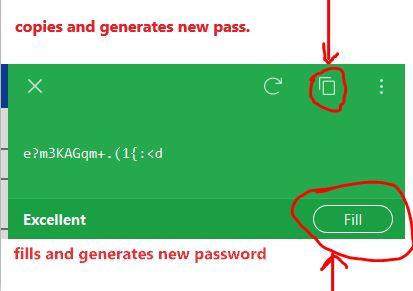
  1. OMG It's got even worse, "Fill" option is broken too. Even if you don't use the "copy" button and just want to "fill" whatever is generated it will still generate new password once you hit "fill" button. How is this possible to have been released ?
  2. Emperor joined the community
  3. Just lost access to 2 websites and couldn't figure out why. It turns out when you let Enpass generate new password and want to copy this into the website form it generates new password instead of just copying it !!! I originally didn't spot it so once password was copied and it worked on the website I then hit "fill" and saved it. Of course I couldn't login any longer as Enpass generated new password when I pressed a copy button. Can this be fixed asap please as this could cause serious hassle to any user using Enpass

Account

Navigation

Search

Search

Configure browser push notifications

Chrome (Android)
  1. Tap the lock icon next to the address bar.
  2. Tap Permissions → Notifications.
  3. Adjust your preference.
Chrome (Desktop)
  1. Click the padlock icon in the address bar.
  2. Select Site settings.
  3. Find Notifications and adjust your preference.