

Skip to content
View in the app

A better way to browse. Learn more.

Enpass Discussion Forum

A full-screen app on your home screen with push notifications, badges and more.

To install this app on iOS and iPadOS
  1. Tap the Share icon in Safari
  2. Scroll the menu and tap Add to Home Screen.
  3. Tap Add in the top-right corner.
To install this app on Android
  1. Tap the 3-dot menu (⋮) in the top-right corner of the browser.
  2. Tap Add to Home screen or Install app.
  3. Confirm by tapping Install.

yellowtee

Members
  • Joined

  • Last visited

Everything posted by yellowtee

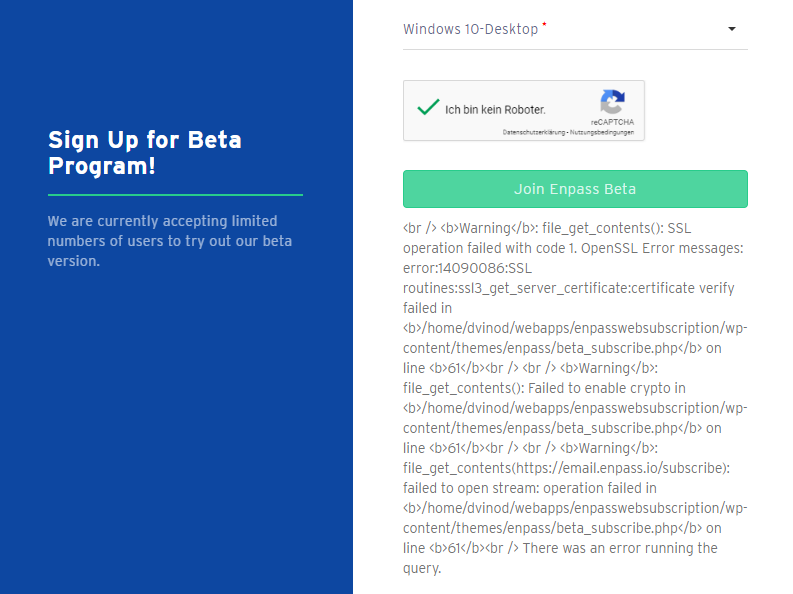
  1. Hello, when i try to sign up for the beta program i get this error, it seems that your PHP code is a little bit broken at that point.
  2. Hello, I uploaded a video with the issue I have, please see:
  3. I can confirm that the steps from above aren't solving the issue for me.
  4. Hello, I have the same issue.
  5. Hello, I have here a freshly installed Win10 PC on which I would like to use Enpass. I downloaded Enpass from the Windows Store and tried to activate the iCloud-Sync, the login to icloud via browser works also, but if I am redirected to Enpass via browser Enpass crashes. Do you have an idea where I can find logs for this or even solve the problem?

Account

Navigation

Search

Search

Configure browser push notifications

Chrome (Android)
  1. Tap the lock icon next to the address bar.
  2. Tap Permissions → Notifications.
  3. Adjust your preference.
Chrome (Desktop)
  1. Click the padlock icon in the address bar.
  2. Select Site settings.
  3. Find Notifications and adjust your preference.