

Oxymed32
-
Posts
7 -
Joined
-
Last visited
Posts posted by Oxymed32
-
-
Hi @Vinod Kumar,
thank you very much for your answer but as I am using MacOS Mojave this workaround is not valid for me.
Greetings
-
Really? Am I the only one with that problem?

-
Hi, since I am using the new version 6 I have huge trouble to use Enpass on my Mac (macOS Mojave Version 10.1.4.1 Beta). Sometimes I can not even start, I just see a gray box and nothing happens. Sometimes I am a bit more lucky and can start it but then after a few moments doing nothing specific the app just don't react anymore and I have to force close it. I tried to uninstall and reinstall it but that didn't help. I am a bit frustrated now as I have no idea what else I can do to get access to my passwords again. Please help me!!
Greetings, Oxymed
-
Great, thanks! No idea how I could not find that

-
Hi guys,
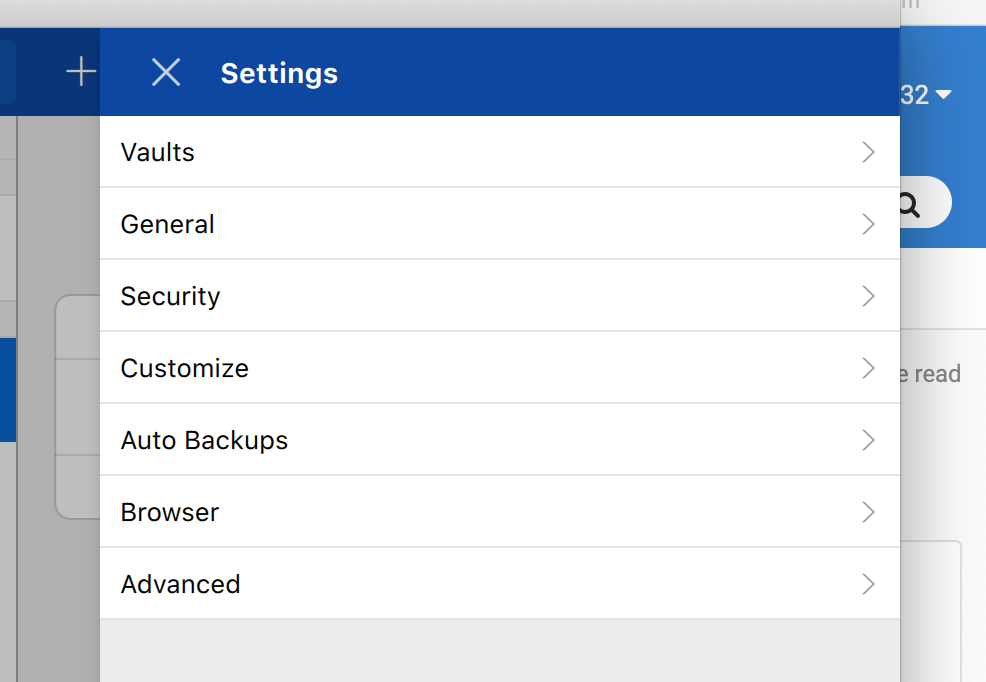
I am using the latest beta 6.0.0 (220) and I am trying to find out how to sync with my WebDaV Server (Synology). I am not able to fine any sync option within the application (Dropbox, iCloud etc.), there is no menu item in settings for this (see screenshot). And then I am clicking on Tools -> "Sync now" from the menu bar, then nothing happens. Am I just to dumb or is this function maybe not available in the beta (which would be a bit weird.)
Thanks and best regards, Oxymed
Can not activate Pro Version on iMac
in Mac
Posted
Hi,
Enpass 6.0.3 (300) on MacOS Mojave Version 10.14.2 is telling me that I haven't purchased the Pro Version yet when I try to activate the premium functions on my iMac. But I did purchase the Pro Version via inApp Purchase on my iPhone in December 2017 already. On my iPhone I am using the Pro Version without any problems via the same apple account of course.
Any ideas what I could do?
Thanks, Oxymed