
Jump to content
View in the app

A better way to browse. Learn more.

Enpass Discussion Forum

A full-screen app on your home screen with push notifications, badges and more.

To install this app on iOS and iPadOS
  1. Tap the Share icon in Safari
  2. Scroll the menu and tap Add to Home Screen.
  3. Tap Add in the top-right corner.
To install this app on Android
  1. Tap the 3-dot menu (โ‹ฎ) in the top-right corner of the browser.
  2. Tap Add to Home screen or Install app.
  3. Confirm by tapping Install.

DetlefS

Members
  • Joined

  • Last visited

  1. Hi kaos-it, you where right, that was the issue. Moving the storage folder solved the issue. Thanks a lot!
  2. Hi, my OneDrive (Business) is reporting a sync issue. See attached screenshot. OneDrive will only sync, when I close Enpass. This doesn't seem right. Or is it expected behavior? I'm using Enpass 6.8.2 (1085)
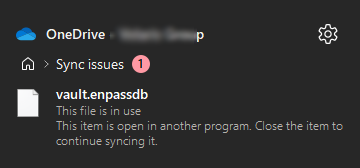
  3. For me it happens each time I wake up my Mac from sleep mode. Mac: Mini M1, 2020 OS: 12.3.1 Enpass: 6.7.4 (938) from the AppStore
  4. I'm, not using Microsoft Store for purchases (because of reasons). Is there any other way to purchase the Windows Premium version?

Configure browser push notifications

Chrome (Android)
  1. Tap the lock icon next to the address bar.
  2. Tap Permissions โ†’ Notifications.
  3. Adjust your preference.
Chrome (Desktop)
  1. Click the padlock icon in the address bar.
  2. Select Site settings.
  3. Find Notifications and adjust your preference.





