Skip to content
View in the app

A better way to browse. Learn more.

Enpass Discussion Forum

A full-screen app on your home screen with push notifications, badges and more.

To install this app on iOS and iPadOS
  1. Tap the Share icon in Safari
  2. Scroll the menu and tap Add to Home Screen.
  3. Tap Add in the top-right corner.
To install this app on Android
  1. Tap the 3-dot menu (⋮) in the top-right corner of the browser.
  2. Tap Add to Home screen or Install app.
  3. Confirm by tapping Install.
  • Search By Tags

    Search will match any tag entered
  • Search By Author

Content Type

Forums

  • General discussion
    • Hot topics
    • Enpass Support & Troubleshooting
    • Registration and Purchases
    • Autofilling and Desktop Browser Extensions
    • Data Security
    • Announcements
  • Help us improve Enpass
    • Feature requests
    • Enpass Beta
    • Localization
  • General discussion

Find results in

Find results that contain...

Date Created

  • Start

    End

Last Updated

  • Start

    End


Filter by number of...

  • Minimum number of replies

  • Minimum number of views

Found 3 results

  1. Hello everyone, I’m running into a usability issue when logging into PayPal on my iPhone and would like to understand if there’s a smoother workflow. My current setup: PayPal login using Passkey / Face ID on iPhone Additionally, two-factor authentication (OTP) enabled OTP stored in Enpass The problem: When I log into the PayPal app: Authentication via Face ID works fine However, I still need to enter the one-time code (OTP) The OTP is not automatically available (e.g., copied to clipboard) This means I currently have to: Leave the PayPal app Open Enpass Search for the PayPal entry Copy the OTP Go back to PayPal and paste it This feels quite cumbersome. My questions: Is there a way to access the OTP from Enpass without leaving the PayPal app? Can the OTP be automatically copied to the clipboard or autofilled on iOS? Is there a recommended workflow for using Passkey/Face ID together with OTP in apps like PayPal? Are there any iOS features (AutoFill, extensions, etc.) that can streamline this process? I’m looking for a more seamless and efficient way to handle this login flow. Thanks in advance for any suggestions!
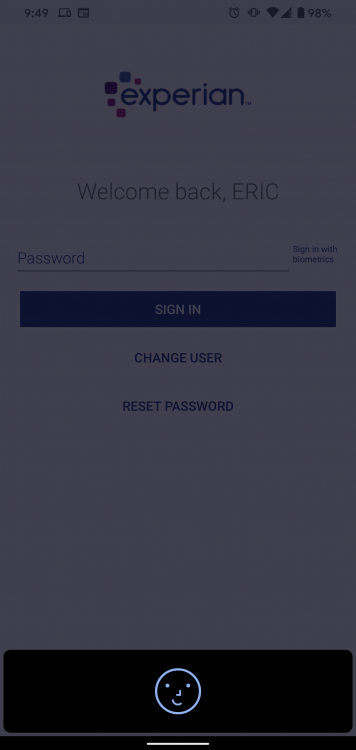
  2. There are two ways to code Face ID on Android. One that requires you to press the confirm button after the face recognition process and one that doesn't. The extra confirm button press doesn't add any additional security. I wish Enpass would switch to the one that just unlocked when it saw your face. I have uploaded an example of the Experian app that used the one that doesn't require a confirm button press.
  3. Hello, I used 1password before and i am a little disappointed now. I often use the password manager to log in to websites or apps. I can use the enpass extension here but always have to enter the master password. Touch ID or Face ID only work in the main app but not in the extension. This was much more comfortable with 1password. Is an update planned for the near future? Otherwise I will quickly cancel my purchase at Apple to get the refund and stay at 1password.

Account

Navigation

Search

Search

Configure browser push notifications

Chrome (Android)
  1. Tap the lock icon next to the address bar.
  2. Tap Permissions → Notifications.
  3. Adjust your preference.
Chrome (Desktop)
  1. Click the padlock icon in the address bar.
  2. Select Site settings.
  3. Find Notifications and adjust your preference.