Search the Community
Showing results for tags 'virus'.
Found 3 results
-
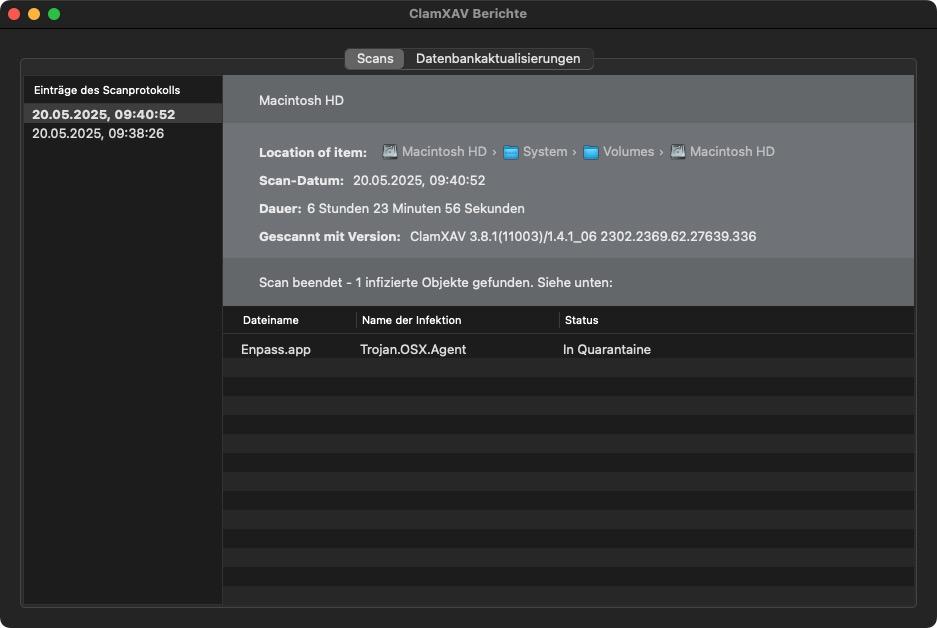
Good afternoon, running ClamXav on my newly setup M1 MacBook Air I got the message that Enpass would be infected with Trojan.OSX.Agent. The app was quarantined. To confirm (and as I wasn't sure which version - download or Apple AppStore - I was using) I first downloaded the App from the enpass.io website to get the same result again. Installing Enpass via Apple App Store gave a clean version that wasn't infected as of ClamXav. Kindly check on the supplied version of your website and mitigate the risk for my fellow macOS users.
-
Avast Security 13.11 with virus definition 19020502 reports an infection blocked when launching Enpass 6.0.4 (331). It reports that Avast Filesystem shield has blocked a threat and moved it to the Chest. The infection is reported as MacOS:Agent-FW [Trj]. It thinks the process is /Applications/Safari.app/Contents/MacOS/Safari and the file infected is /Applications/Enpass.app/Contents/MacOS/importer_enpass. The same was reported for the previous version of Enpass. This has only occurred since updating to the latest version of Enpass with the new user experience.
-
Hi @Enpass team I'm facing kind of a problem.... Enpass 5.6.8 get removed by Antivirus (Avast Free) and get positive on virustotal..... Or also https://www.virustotal.com/fr/file/7d7fc9aa37bc37765d2ed7dcd75c9787d74317941a59aca84ddbcd2126492b4d/analysis/