Leaderboard
-
illogic-al
Members3Points14Posts -
phg
Members2Points29Posts -
Hemant Kumar
Enpass team member2Points149Posts -
deus62
Members2Points2Posts




Popular Content
Showing content with the highest reputation on 01/01/19 in all areas
-
Thanks for the recommendation. I was looking into Pass, but I'll check out bitwarden as well.2 points
-
I rarely ever comment on these kinds of forums re update problems, but the experience with this update was so piss-poor (and still is) that I decided to do so anyways. I'm not even going to get into the details, but updating to v.6 required me to reset my Windows 10 setup (rollback) ignore frequent "error 400" messages figure out why Enpass didn't connect to my OneDrive account (my backups aren't in any default location) search endlessly for answers in fragmented help/support files/forums (it was pure chance that I found the answers) check if this update was actually legit !!! (I seriously doubted that at some point and thought Enpass must have gotten hacked) ... Several hours later I've got the new version running and - (place drum roll here) - I find out I've got to pay for features I once had. I have yet to (re-)configure/(re-)install the Opera browser extension (what a pain in the neck) and I haven't even looked at the Android version yet. My take? Many, many people who are not somewhat computer-savvy are going to pull their hair out over this one and I suspect that many people will consult outside help to get the update to work. Now, if this were some random app, I wouldn't care, but for hours today, I thought I had - permanently - lost access to the most important information in my possession, bank account , credit card, payment services etc., PASSWORDS! I'm sorry, but what Enpass forced on its customers here (unsuspecting customers at that) is and was an absolute catastrophe! Never again. I'm out ... even if the functionality costs more elsewhere. I've lost all trust (in a few hours) Bye.2 points
-
Open my the Enpass app this morning in my Android phone (Moto X Pure, Android 7.0) so that I can login to my router to change a few settings. Found out the app was auto updated to v6 (I had auto-update turned on in Google Play). App looked great at first. Entered my master password and thought I would be good to go. A few seconds into the app I was horrified that my passwords (100+) are missing. I saw this so called "Primary" vault with nothing in it. I thought maybe I just need to setup the sync to my Onedrive account to retrieve my passwords. So I went ahead and setup the sync. The app crashed 3-4 times along the way (not a good sign). Neverheless, I was able to setup the link but my passwords are still missing. Frustration sets in. I opened the Enpass v6 user guide looking for answer. Nothing there. So I went to this forum for help. Luckily there were already people here having similar question and issue. There are instructions from Enpass on how to restore your password from v5 to v6. Instruction says to download the v5 wallet file from my OneDrive account into my local storage and perform a restore. I couldn't find the restore option on the "Primary" vault. So I proceeded to create a new vault and the restore option was then available. Selected my wallet file to be restored and Enpass asked for my master password. Entered my password thinking this was the end to my misery. Bad luck. Enpass crashed. Reopened the app and tried it again. Same result. I sent the crash log to Enpass after it crashed over and over again. I have opened a support ticket as well but it will be a while before I hear back. The app on my Win 10 PC was also auto-updated to v6. I tried to perform the restore there but ended with same result. The app crashed. This is such a bad experience that prompted me to to share it here. Enpass is supposed to help me manage and protect my passwords. Turns out, it can also lock me out of my passwords. Communication is glaringly missing here. Enpass has failed to communicate such a big change with v6 to its user base. Especially, the fact that v6 won't sync up passwords from the old version and we have to perform a restore in order to get our passwords into the new version. PS: I was able to go back to Enpass v5 to get my passwords back.1 point
-
I'm in bad need of help here. I relied on my fingerprint reader (Samsung Note 8) to access my Enpass, instead of the main password I forgot. With the upgrade, the fingerprint recognition disappeared, and now I can't access my stored passwords anymore. Please, tell me there is a workaround for this issue!! Andrea1 point
-
1 pointI purchased Enpass for Android around a year ago. This morning, I opened the app and it was updated to the newest version, Enpass 6. However, the Desktop version of Enpass 6 is horrible. It does not look like a PC or Mac app at all! It looks like a tablet app. So I will not update to Enpass 6, and I will keep using Enpass 5 on desktop. However, the new Android app does not sync with the previous desktop app. So how can I downgrade the Android app, which I already paid for, to the previous version?1 point
-
In older versions of Enpass on Mac, I could do this: Click on menu bar icon Navigate with arrow keys to desired item Type cursor right to view more details on the item Cursor down to the password row Hit 'Enter' to copy it to the clipboard In Enpass 6.0.0, steps 4 and 5 no longer work. Is there any way to accomplish this on Enpass 6? And if not, can you please add a keyboard-only way of doing so soon? I am starting to regret this update1 point
-
I am in exactly the same boat. We either need to be able to access an older version where fingerprint access works or the new automatically updated version needs to have fingerprint access added ASAP so the account can be accessed. I too have purchased and recommended Enpass to others and have important information that I now can't access.1 point
-
1 point
-
Hi guys This is the issue related to the Graphics card driver, also as mentioned by @Roger . You can fix it by using the steps mentioned here https://www.enpass.io/support/enpass-starts-with-blank-white-screen-on-windows-how-can-i-fix-it/1 point
-
Hi Hemant Kumar Thank you very much!! After upgrading all iOS appliances to V6 the sync to iCloud Drive works fine! I checked also these links. https://discussion.enpass.io/index.php?/topic/5326-icloud-no-enpass-folder-but-sync-works/&tab=comments#comment-11484 https://www.enpass.io/docs/manual-desktop/sync.html#supported-clouds Best regards Seagull1 point
-
Hi Thanks for reporting. We have fixed the issue and will be available in the next update. It was the problem with the Animation of sync icon. Please wait for the next update.1 point
-
Sorry, but this is utter BS. Blaming Microsoft for being "limited by technology and restrictions" is a pretty bad excuse for screwing over your valued customers, who have paid for the now worthless lifetime license. YOU chose to create a new product, not Microsoft. You could have easily kept the app on the UWP platform and update 5.x to 6.x without making your customers pay again. But no, YOU chose to create version 6.0 with a different underlying platform, so of course it's considered a new/different product. Regardless, you could have worked out something to let users upgrade for free, but again YOU chose this path deliberately in order to create a new stream of revenue. I'd be totally fine paying for an upgrade hadn't you advertised and sold the previous version with a "lifetime license". The current situation is simply NOT ACCEPTABLE and should be considered SCAM.1 point
-
Enpass has failed. I paid for the software on BlackBerry 10. Enpass deceived me to pay again for BlackBerry Android blaming it on different appstores, although both ecosystems as far as I was concerned was Blackberry. Time moved on and I got over it as the power of Enpass was very convenient. Who's idea was it to change the icon? Icons should be bold and clear, why the weird shape of a keyhole. Do you even realise how crap, unprofessional and SMALL it looks in the windows system tray??!! I rely on my desktop a lot and use the mobile apps of enpass for viewing rather than creating passwords. Now the premium features in windows have been added. Sadly, anyone who has windows 10 will know what a mess Microsoft has made on the October 2018 update. My windows store wont even allow me to sign in and I cant afford another re-install. All my windows is in dark theme mode, yet enpass now WANTS TO CHARGE me for a desktop app which was meant to be FREE FOREVER. I thought by paying TWICE for the mobile app, the desktop version was never their focus for the revenue. I guess I was wrong! Folders were more professional in my opinion. It let professionals 'file' passwords. Tags are just socialising it and for me its made the software feel too gamified social type. I dont feel so confident with these all of a sudden changes. Time to look for an open source version while the proud owners of Enpass sit in India and count their revenue laughing at me. It's okay, I'd rather be heard by a developing open source password project than become your product than you can benefit from.1 point
-
1 pointThere are 3 things I've noticed so far that are different: When creating sub-tags the tag structure collapses and you need to re-navigate to the sub-tag that was just created. This also happens when I drag+drop an item onto a sub-tag. I'm constantly re-expanding tags / sub-tags. I know that's a minor complaint, but the amount of clicking and scrolling I find myself doing in general now is pretty annoying. Like apollo13 said, duplicate tags aren't allowed. We use the folder structure to organize by customer, then service, so we have a lot of duplicate names. For example: Customer 1 Office 365 Customer 2 Office 365 In Enpass 5 I could navigate to a folder and any items I created after that were automatically put into that folder. Now I need to either enter the tag name by hand, which is extremely difficult given the number (and length) of tags we have. Alternatively, I can search for an item after creating it and drag+drop it into a sub-tag. To use Office 365 as an example, Enpass 5 was really good. I'd navigate to a customer's folder, create an "Office 365" sub-folder, and add passwords as I created users. When I saw the tags in the beta I assumed they were going to work almost identical to folders, just with a different name. I regret that I didn't test it more thoroughly. All of our phones have auto-updated to version 6, so I'm going to end up updating to v6 on the desktop and will have to live with all of those annoyances for now. #2 seems like an input bug. When I try to create a sub-tag called (ex:) "Office 365", it tell's me the tag exists. However, when I look at the tags listed in an item, it seems like the tag is actually "Customer 1:Office 365" or "Customer 2:Office 365", so it's not really a duplicate, is it? I can also work around the limitation by typing a new tag manually. For example, "Customer 3:Office 365" is allowed.1 point
-
My setup with multiple devices I rely on using Enpass 5 is now broken for no good reason. The web extension I am using auto updated itself to a new incompatible version, the desktop version auto updated to a new version, but the version in my phone, which I paid for, can't not be updated to the new version. Even if I wanted to use the new version, which I won't, I would need to buy a new phone, which I won't in the near future just because of this. So, where are ALL the older versions 5 for each platform, why aren't they available? Where are they? I am hoping this is not a depictable scheme to force users pay Enpass developers for features they already have, they don't need or just don't want. The whole point of spending money to thrust my data with this application was to precisely avoid this kind of problems.1 point
-
1 pointI hope you're being sarcastic, because I certainly was. The last thing I want to see is a subscription model. The idea that I could buy once and never have to worry about renewing to avoid losing access is what originally attracted me to Enpass. Unfortunately, that seems to no longer be the case...1 point
-
One main function of the old version I, and you and everyone who has both versions can no longer use is ... synced passwords! The new version of enpass does not use the same database as the old version. That means that every new password created in the new version will not be synced with any old versions. This is a deliberate decision on the company part, and not something that was "needed". I happen to be a software engineer so I am familiar with how these kinds of decisions get made. Likely scenario: an architect decides that they want to 'simplify' things and use a 'better' database schema or whatever, product manager signs off on the change. It gets implemented. Once it finally gets to QA they realize that it doesn't work with the old db. The cheapest solution is to break compatibility with the old database. That would mean that once they upgrade the database you can never downgrade (unless you have very recent backups) without losing data. So the file extension is changed. That way only new users get the new database. Hurray! Except it's not hurray. As they are **forcing** people to upgrade to the new version, while taking away features (see my previous posts). And for what? Better revenue stream. If they actually cared about customers, they would provide a way for the customer to upgrade on their own terms. This is about money, plain and simple. And while you may still be served by there current freemium business model, there are others of us who are not. Furthermore, some of us choose to hold people accountable for their actions. You treat me like a number in a spreadsheet, I will treat you and your product like a discardable commodity. You treat me like a valued customer (and I would think I should be since I actually paid for android and ios mobile versions) and I will happily shut up and give you my money. I'm not feeling very valued right now, just duped and deceived. Especially since I know there is NO technical reason for them to not provide a way to stick to the older versions (via legacy extensions in the chrome store), besides corporate greed.1 point
-
Just save the html as .txt file and import it in V6. Even though it shows csv it will also import text files for lastpass @Duncan.K1 point
-
1 pointthis application is becoming a SCAM - seeing what developers did with latest version there is nothing else to say sad but true I hope we will not see tomorrow on all forums our passwords - you never know - once you catch someone on cheating you will never trust him (vide: "lifetime license" or "free Desktop version")1 point
-
Same issue. I have a pixel 2. did a factory reset. running Android 8.1. play store says enpass is not available. Please take a look into this it is a serious problem with your new release and the play store. I can not use my phone without enpass. **** edited still not in the play store but I was able to download ver 5.6 from https://www.enpass.io/support/where-can-i-download-older-version-of-enpass/ **** edited updated to android pie 9.0 and now I can install enpass 6 from the play store.1 point
-
Hi, did you remove the "Make Website Favicon as Icon" Option in Enpass? It was there in the Enpass 6 beta versions, but seems like it was removed in the final release. Thanks1 point
-
By accident I realized that the database gets updated and converted once I open Enpass on the phone. I discovered the app was auto-updated and I clicked yes to everything. Then, going back to my PC, the windows-store app synced and updated!1 point
-
@Vinod Kumar - can you please publish the original version 5 enpass packages on the relevant stores asap. That way we can stick on v5 until the v6 upgrade problems are fixed. I have backups and an export (CSV inside an encrypted zip) from v5 because reading the reviews and comments here has, very sadly, brought me to conclude that your company cannot be trusted to safely take your customer base to a new major version. It must be frustrating to build a new version that you're all no doubt very proud of, only to have the upgrade process of getting there so poor and so difficult. Buy yourself some time with your loyal customers and give us the option of staying on v5 for a while and then we can try out your new work in v6 independently and see if it's worth paying you for the new features. I would not like to see enpass fail because of this upgrade fiasco. Make it right and do so quickly please! Please reply to this with a list of locations where v5 can be found. Thank you.1 point
-
Hi @Vinod Kumar, just updated the drivers and everything is working fine now. Thanks for your help!1 point
-
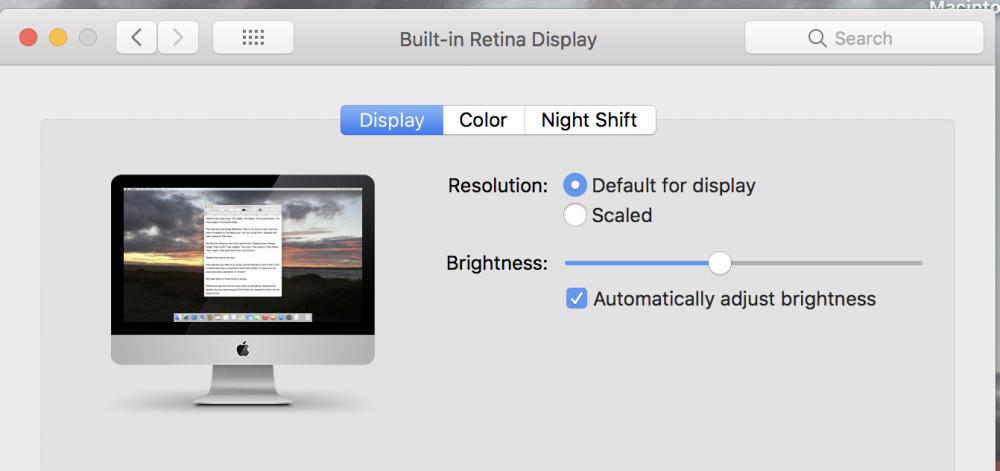
1 pointO/S High Sierra 10.13.6, iMac (Retina 4K, 21.5-inch 2017) display resolution isn't listed but it's set at default (see screen shot). I use Enpass everyday and version 6 is unusable. Please give me a link to download version 5. I wasn't allowed to post a new reply to the thread but this issue appears to be solved............. I scaled my display resolution to the next larger text size to see if Enpass would display the garbled text readable and all text displayed correctly, it was a bit big but everything was readable. I reset my resolution back to default and now all text in Enpass displays correctly. Not sure what to make of it but if anyone else has this problem just set the display resolution one step larger launch Enpass then set the resolution back to default and all should be good.
 1 point
 -
1 pointReposted from Beta forum now version 6 launched. Multiple Vault Feature/Enhancement Suggestion: One of the great things with the multiple vaults is the ability to keep different sets of information separate - and sync'd via different channels. To improve them further, it would be really good if you could allow more control over the security of each vault so that, for example, you could: 1. disable PIN/Windows Hello access to one or more of the more secure/private vaults being stored so that the full password or an alternate PIN had to be used; 2. set up whether or not a vault is included in the "All Vaults" usage including searches. This would allow sensitive vaults to be stored but properly partitioned from the main vault - and would make the multi-vault feature even more useful and compelling.1 point
-
As mentioned by other users this update is extremely disappointing and is pushing me to look for alternatives for Enpass. Charging for old features such as unlocking with Touch ID is a bad precedent and worries me that Enpass may convert to a subscription model in the future. The Mac version of the app looks unpolished and looks worse than the previous version. It doesn't look like a native Mac app and instead merely a secondhand thought to the Windows version. I beg you guys to improve on the areas mentioned and don't ignore your users. Upgrading to pro is not an issue for me. As a matter of fact, I was more than willing to purchase it and excited to buy new features, but I do not want to spend my money on a product I have no confidence in, and unfortunately, this update has caused me to lose a lot of it.1 point
-
I'm very disappointed with this update. Sync is broken, browser integration is broken. Everything was almost perfect in the previous version.1 point
-
It's sad to say but I think you released a poor beta of Enpass. When I follow all the topics in the forum and considering my own experiences, I am not sure If I should trust my Data to Enpass anymore. Let's see what is reported so far - Not working Sync - Not working Pro Upgrade - Not working Browser Extensions - Corrupted databases or missing passwords after upgrade - get charged for features that were free in Version 5 Considering all of this, I ask myself two things 1. Have you tested your Software and Plugins before the release or was it more important for you to get money from your existing users? How can I trust a company that releases a bad beta version an a final realease that handles personal and confidential data? 2. What will come next when now ask for money for old features? What kind of business is that? For new features, ok. I would be willing to pay on order to support you. But not this way. I really thing about to switch to another products now.1 point
-
1 pointIt uses a hamburger menu and context menus can't be drawn outside the main window, so if you click an item that's near the end of the list it will have a weird placement. I don't care if it is unsupported. Data is secure and encrypted. I want the good old v5 version that I paid for!1 point