


bunnyhero
Members
-
Joined
-
Last visited
-
followup again: after removing attachments, i was able to successfully export to JSON. i still get the error exporting to CSV though. at least i can get my data off this godforsaken app now.
-
just got the exact same error trying to export my primary vault on mac! i'll try a reinstall i guess. UPDATE: reinstalling did not help. here's my information: macOS version: 13.6.1 (22G313) vaults: 1 attachments: 1 items: 1362
-
please fix quickly. it wouldn’t be as annoying if the message in the app wasn’t “looks like you haven’t used enpass in a while,” which is categorically untrue.
-
Finally got 6 activation codes, AN HOUR LATER. DO BETTER PLEASE.
-
Another day, another pain-in-the-butt problem with this gorram app. I've had Enpass installed on my Windows PC for years, but tonight, after a reboot, Enpass is asking me to activate my account with my email again for some unknown reason. No problem: just enter in my email address, right? So i do. And I wait. And wait. And wait... I continually check my spam folders, too. Nothing. 15, 20 minutes later. Still nothing. WHY. This is ridiculous.
-
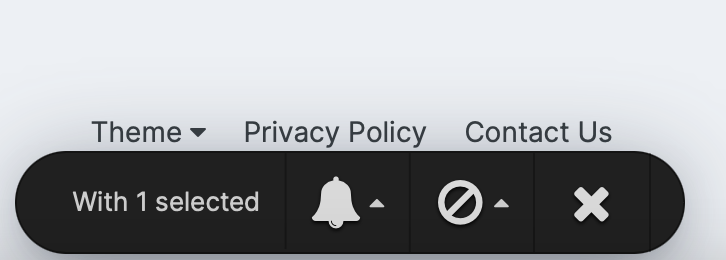
that "X" button on this toolbar looks too much like a "close" button. if you've got several items selected, and decide not to do anything, you might be tempted to click "X" to dismiss this hovering panel. turns out that's the "unfollow topic" button, which i didn't see in the tooltip until it was too late. also there's no "undo". please change this icon; or at least add a confirmation dialog, or better yet, an undo.
-
-
i managed to fix this (for now at least) by resetting all settings in enpass desktop and starting fresh. i hate having to do this because i have to set up all my other settings each time (autolock timeouts, touch ID, etc. etc). i wish those settings could be exported separately from the vault. meanwhile, i'm not sure how many passwords i added before sync stopped working. that is-- how many passwords have i lost because they weren't synced to the dropbox vault before resetting? i had to reset one password tonight already thanks to this broken dropbox issue: that's at least one lost password. perhaps i could have recovered this password if i'd been able to merge a backup with the vault on dropbox, but i didn't want to risk losing the rest of my data, or having to spend hours removing duplicates. the unreliable sync issues (and having to reset all my data to resolve) makes me very concerned about whether i should keep trusting this app to keep my passwords in sync and to not lose them!
-
-
ok but is there a way to disable that, now that i know about the new feature? or can you at least tell me where the old shortcut is stored so i can manually edit it? since i know the feature is there, i’d rather get a no-op when hitting the old key combo rather than getting the settings because it’s incredibly annoying. thank you
-
-
Thank you, that worked! (Unrelated to my initial issue: I dislike that the new version of Enpass no longer lets me use the browser shortcut (Command-\) that I have been using for literally years. When I type it, the extension settings appear instead. It's going to take some time to retrain my muscle memory. I don't understand why the change )
-
Enpass Safari extension is not working on this one website for me. Go to https://www.medavie.bluecross.ca/gmpe Use Enpass extension to autofill login form fields Result: Nothing happens: form fields remain empty Expected result: Autofilled form fields If I look at the developer console, I see this error: SyntaxError: The string did not match the expected pattern. I'm on Safari 15, macOS Monterey 12.3.1, Enpass 6.6.3 Thanks!
-
The wording of that dialog needs to be made clearer. It is INCREDIBLY confusing and ambiguous! Why does this happen? What is the root cause of this? If it just happens randomly, it doesn't exactly make me feel confident about the reliability and security of this service
-
same thing is happening to me right now. i just downloaded and installed 6.6.2.827 to see if that would help, but i'm getting the same result. enpass not responding, program manager shows 0% utilization of cpu & disk. only antivirus i have installed is the built-in windows security. i haven't changed any enpass settings in months, maybe years. running windows 10 home, 20H2, build 19042.1052. thank you! UPDATE: enpass finally started to respond, after something like 5 minutes of being frozen. wow.
