

Leaderboard


Popular Content
Showing content with the highest reputation on 01/13/20 in all areas
-
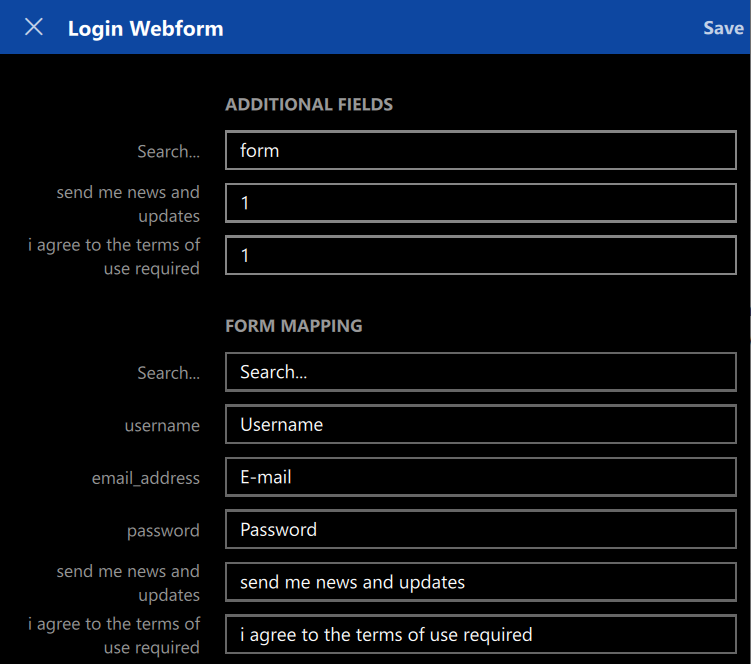
1 pointHi, I recently dropped Lastpass in favor of Enpass 6, and so far I'm loving it. However a feature that can be improved, especially for power users, is the webform mapping screen. I am currently using the Windows 10 version and the relationships between form fields and enpass items seem to be read-only (apart from selecting a item field to map to) and can only be captured by browser extensions. A lot of those fields are required during sign-up, but not for further logins. I would like to have the ability to manually edit the webform mappings. Specifically, I would like to: Create webform mappings for manually created enpass items / logins Rename form field ids Add or remove form fields Add or remove "additional fields" Note: this could also be used to map TOTP fields to the webform, as also requested here
 1 point
 -
Some services I use require to add credit cards number in four individual segments e.g. 1111 2222 3333 4444 Each segment is an input box, so coping the entire CC number from Enpass doesn't work. I have to manually enter the numbers in each box. It would be great if Enpass had a way to copy each of these segments, so we can paste them in the form. Thanks1 point