Leaderboard



Popular Content
Showing content with the highest reputation on 12/29/20 in all areas
-
2 pointsI am also very disappointed, my switch to bitwarden worked smoothly today.2 points
-
1 point
-
1 pointI have a pro licences for my MacBook, iPhone and android devices and I can't believe this isn't enough to get all the features. Really enpass after tons of recommendations resulting in people buying more pro licences, I will not be reccomending this platform anymore, and will be moving away asap if this is not fixed with some sort of plan.1 point
-
1 pointvery bad move, i was expecting at least a free one year premium for the pro users....instead they showed us the door1 point
-
1 pointCongratulations Enpass, you have just lost 3 users. One can only hope Enpass goes bankrupt. Alternative is sought1 point
-
1 pointGood job. Your questionable business strategy finds its way into press reports and tech blogs. Androidpolice - Enpass irking pro users1 point
-
Update: I waited few minutes, and now app start showing right version. Enpass stoped showing "Enpass Pro Lifetime", and started showing "Enpass Premium Lifetime". So my thread can be closed.1 point
-
Hi @Garima Singh, That's not the problem. I'm already using TOTP for some websites. But thanks for the link.1 point
-
1 pointHi, I had the same problem. Enpass Password Manager exised in Task Manager but no window showed up. Enpass could be used from within the Taskbar, but it was not possible to open Enpass in a Window. I was having the same problem on both the Microsoft Store and Standalone versions of Enpass - the window would not open. My solution was to run Revo Uninstaller and do a "Forced Uninstall" (Advanced) of Enpass, cleaning out all reference to the program. After this I reinstalled Enpass from the Microsoft store and it now runs normally again.1 point
-
1 pointThey actually know that PRO users can no longer generate revenue for them, as long as they offer the same features as Premium users. So, using this approach forces you to make a choice, either leave or pay. Maybe that's the business path of enpass, it's not the early supporters that matter, but the ones who can bring them benefits. Can they be trusted to keep our passwords when they can't even keep a basic promise? There is no way I will ever recommend enpass to anyone from now on.1 point
-
1 pointPro users continue to use the PRO function. But why is the new feature is not a pro, but a premium feature? When you add the ability to add ahead as a Premium feature, Pro users are very angry. Obviously, PRO users said they can add new features in the future. But what about reality? We have created a new title called Premium. Is there a guarantee that new titles should not come out after the premium? If so, should I buy a new title again? This trust will fall.1 point
-
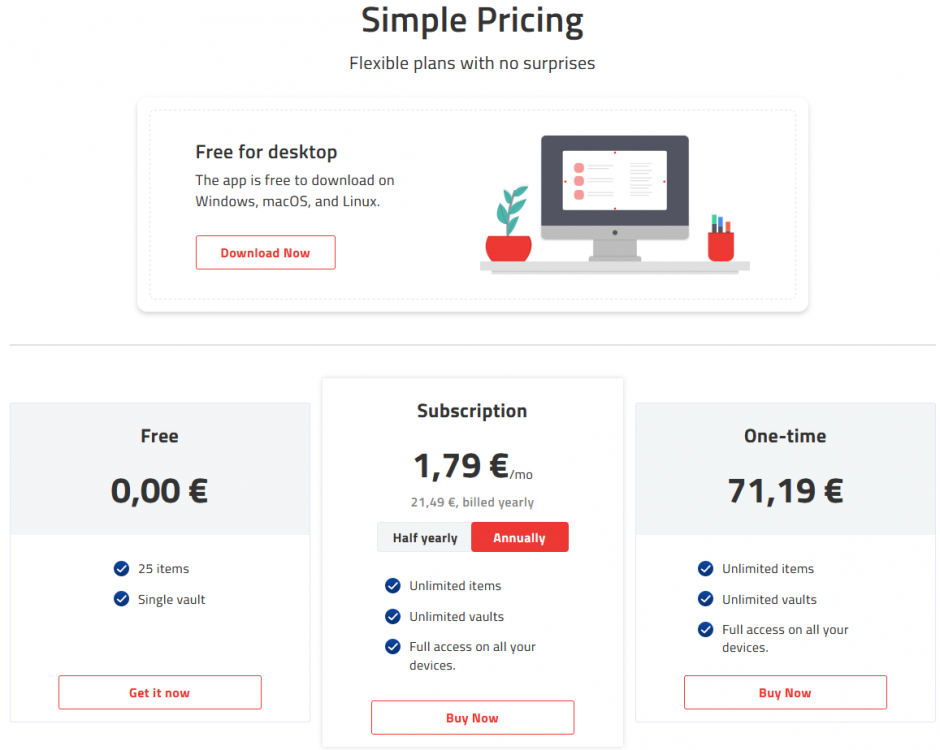
1 pointHello @Garima Singh, no, I DO NOT UNDERSTAND and also have the feeling that you have unfortunately not even bothered to read through the posts. You are using a generic copy-and-paste answer, which you also posted here for example: https://discussion.enpass.io/index.php?/topic/14342-concern-about-the-free-pro-upgrade/page/2/&tab=comments#comment-62741 I find it very unfortunate that you don't answer the questions asked and hope that you or another Enpass member might make the effort. This unfortunately gives the feeling that Enpass doesn't care about its customers and is being waved off with standard answers. A premium LIFETIME model IS offered. As an Enpass Pro user, how can I switch to it? I bought the Pro version on several devices at the time to get ALL thus also FUTURE updates AND FEATURES. Lifetime to me means all new features and updates as long as the software is around. Since Enpass is still around, I should get all the new features. With the Pro version all updates AND FEATURES were already promised. Who guarantees that the new Premium Lifetime will include ALL features in the future? And who guarantees that the promise will not be broken again? I would be very happy if an Enpass team member could respond with an answer related to my questions and statements and not again with a general standard answer! It seems to be not only me so that I do NOT UNDERSTAND the handling of existing Pro customers and simply find extremely unfriendly! Especially the standard answer of @Garima Singh has really brought me to boil over.
 1 point
 -
1 pointI would like an answer to that question too. Why do you treat your Premium customers better then the Pro customers that helped you in the beginning by buying licenses and recommendation to friends? I paid for three licenses (iOS, Android and Windows). For the fee of 10 EUR I can start an account with Bitwarden where I am not a second class customer. Think about it!!!1 point
-
1 pointWhy are Pro users not offered a discounted upgrade version to the Premium Lifetime license?That would be acceptable, at least for me, if you pay once for new versions.But to move Pro users to a subscription model now is a no-go for me. That's what I thought too. After Pro comes Premium, then Platinum, Diamond and finally the great VIP status.1 point
-
1 pointThey promised all of this to the pros. But what does a promise count after a year ... Nobody would mind if new users had to pay a monthly fee from now on. But asking existing customers to checkout again, even though enpass has promised not to do so, leaves a negative impression. You lost me and 6 other customers ...1 point
-
Hey @kellybrf Thanks for the suggestion. However, I would like to share that you can can try auto-filling using the Accessibility service, for this please perform these simple steps. 1. Open the Chromebook device. 2. Go to settings --> click on Accessibility. 3. Enable for Enpass. 4. Now open any website in brave browser where he want to auto-fill. 5. Enpass notification will appear in the Chromebook Notification bar. 6. Click on Enpass notification icon and try to auto-fill. Hope this helps!1 point
-
I have chrome book and enpass works well with autofill solution using the enpass android app and enabling it on accessibility. Your problem is something else0 points
-
This is not a helpful solution. There needs to be support for chromebooks. Stop with the excuses. How difficult is it? Other services have done this.0 points