

Leaderboard
-
OLLI_S
Members1Points183Posts -
user from keepass
Members1Points12Posts -
Hitman
Members1Points45Posts -
dhruvit_r
Members1Points3Posts


Popular Content
Showing content with the highest reputation on 02/01/24 in all areas
-
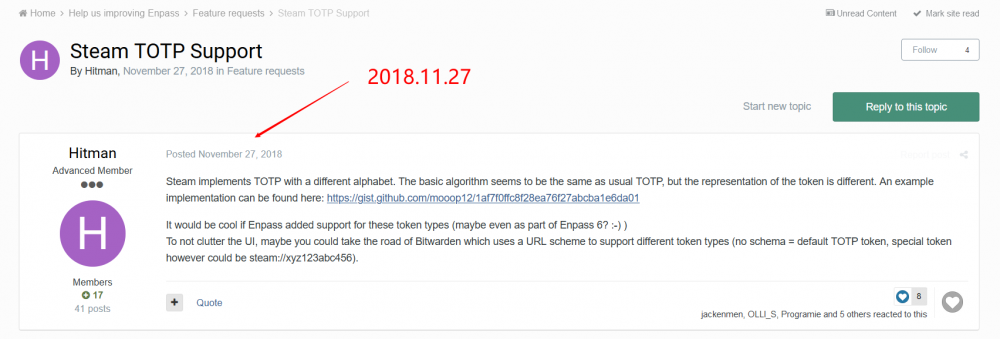
1 pointSteam implements TOTP with a different alphabet. The basic algorithm seems to be the same as usual TOTP, but the representation of the token is different. An example implementation can be found here: https://gist.github.com/mooop12/1af7f0ffc8f28ea76f27abcba1e6da01 It would be cool if Enpass added support for these token types (maybe even as part of Enpass 6? :-) ) To not clutter the UI, maybe you could take the road of Bitwarden which uses a URL scheme to support different token types (no schema = default TOTP token, special token however could be steam://xyz123abc456).1 point
-
Hello, I really like Enpass, but one very important feature is missing: allow to login into Desktop Applications like: Steam uPlay Game Launchers (like “Elite Dangerous” or “Star Citizen”) Database tools Admin tools etc Please add a way to log into applications by pressing the Assistant-Hotkey. To identify the correct application you may use the process name or (like KeePass) the window title (but this is not really secure). Here is the documentation about the Auto-Type feature KeePass: https://keepass.info/help/base/autotype.html KeePass protects the data while pasting using the Two-Channel Auto-Type Obfuscation: https://keepass.info/help/v2/autotype_obfuscation.html Best regards OLLI1 point
-
1 pointThe lastest steam totp request was submitted two years ago, but the reply template is just Perfunctory which we will see anywhere in the forum or auto-reply emails. That's not just , and I have emailed to their address and asked for the feature , but nothing happened. And today I submit it again.
 1 point
 -
1 pointcan you implement global autotype? it basically means that enpass simulates keypresses to log into any application, not just website how this would work: user opens app (e.x. steam) user gets steam in focus and presses keycombo to trigger global autotype enpass detects name of application or application title enpass searches for matching entries, if 1 match is found, simulate keypresses for login (in 95% of cases: {username}{tab}{password}{enter}) this keycombo can be made to be configurable ( for example skype, where you'd need {username}{enter}{wait 100ms}{password}{enter} ) if multiple matches are found, enpass displays a window, letting users select the correct entry, and then autotype the login info if no matches are found, enpass pops up with a search field so users can search the correct entry to autofill ofcource, in the last case, enpass will also ask to remember the application title for that entry this is a feature i greatly miss in the current version of enpass, hopefully you can consider to implement this somewhere in the future. and hopefully you can implement this in Linux as well (since that's the main OS i'm using atm, aside from sometimes Windows kind regards, intuxikated1 point
-
1 pointIt's been 5 years since this was first requested. Please prioritize this.1 point
-
0 points


