


Timotheus
Members
-
Joined
-
Last visited
Everything posted by Timotheus
-
1. I downloaded the application from your website. 2. I have one vault only. 3. My synchronization is exclusively local: wifi between desktop and iPhone. No cloud service.
-
I really do hope this problem will be solved quickly; if not, I'll have to look for an alternative.
-
But ……… why does it take so awfully long to solve this problem?
-
Monterey 12.3.1, Enpass 6.7.4 In the Windows section of this forum I found a post with the title "Enpass freezes, then only works after PC reboot", posted on november 7th, 2021. I have the same problem on a Mac: Enpass freezes very frequently, after which there is no other solution possible than quitting and then restarting the application. This is really a very annoying bug, that should be addressed immediately.
-
Monterey 12.3.1, Enpass 6.7.4. Every now and then the binder (leftmost column of Enpass when it's open) turns transparent, showing part of the screen picture behind the Enpass window. See attached screenshot. This doesn't seem intended behaviour.
-
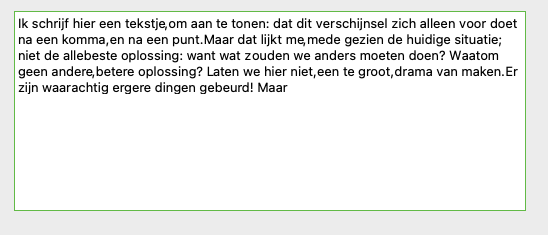
Thanks for your answer, Abhishek. 1. MacOS 12.1 (Monterey), Enpass 6.7.4 (Premium). 2-3. I have observed this behaviour both while creating and editing items, but only after a period or a comma, not after colon, semi-colon, question mark and exclamation mark. Screenshot attached.
-
I noticed that when hitting the space bar after a punctuation mark, Enpass doesn't register the space; in order to get a space after a punctuation mark, one has to hit the space bar not one but two times. Is this intended behaviour or just a bug? Anyway, I know of no other application with a similar behaviour.
