


Yogesh Kumar
Enpass team member
-
Joined
Everything posted by Yogesh Kumar
-
Hi @Plonqor Sorry you are having trouble with that. We investigated your issue but didn't find any problem of such sort. A few examples would be of great help in tracking down where things are getting tangled up. You gave example of reddit but it will be of great help if you give exact url of reddit where you are facing problem. Also please mention platform on which you are running Enpass along with version of Enpass and browser extension.
-
Hi @niemalsnever We investigated your problem with german keyboard but did not found any bug. The keycode captured by extension is 17 for CTRL and for 220 for # which in german keyboard is in place of backslash. You can check keycodes by yourself here.
-
Hi @niemalsnever could you please elaborate what exactly is the issue. Yes the browser plugin will always detect US keyboard layout, but the shortcut will work on every keyboard layout as extension will capture "what keys are pressed", not "what character does key represent". For example if shortcut is set to "CTRL+#" in german keyboard ,the extension will show it "CTRL+\".
-
Hello @My1 Nice suggestion and we have included in our Feature-requests list. Keep suggesting. Cheers!
-
Hi @My1 Sorry for the inconvenience while using Enpass. We have released a new update of Extension for chrome with lots of improvements with autofilling. For other browsers the update will be coming soon. Actually this is possible but it will result in poor performance of website during page load. Currently our extension comes into play only when Extension button is clicked or shortcut is pressed.
-
Hi @Rezl Yes, you can do so once you are on the login page. If you are having a single item of that particular site, it will be autofilled immediately else a list of items matching that website will be presented to select the desired card. For setting up the keyboard shortcut we have more help here in user manual. Yesterday only we have released a new update with some improvements in keyboard shortcut behavior where you can also set the shortcut from Extension settings also. Cheers!
-
Hi guys Sorry for the very late reply. We found out that some scripts are taking longer to run and we are optimizing them. A fix will be released soon.
-
Hi @Phx, Sorry for misunderstanding the problem. On further investigating it, I found that the bank website you mentioned trigger some input validation when extension code try to detect fake text fields and than it breaks the things. A fix will be available in next update.
-
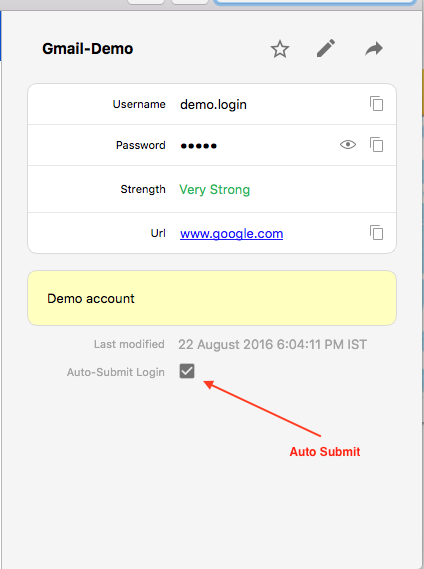
Hello @Phx Sorry for the inconvenience. It seems after autofilling the User ID, Enpass is sending the login signal to hidden form. We have fixed this issue for next release. Meanwhile, you can disable the Auto submit for this particular item after which it will just autofill and you have to just hit the submit button to login. You can disable the Auto Submit for a particular item from its detail pane (A check box is there). Please let me know if it works. Cheers!
-
Run below command in administrator command prompt to revert back CheckNetIsolation.exe LoopbackExempt –d –n="Microsoft.MicrosoftEdge_8wekyb3d8bbwe"
-
Hi guys, Thanks for being active and your feedback. We have accounted this issue to be fixed in future releases. This is what I should say very unusual behavior as Enpass works very well with Chrome Browser. We highly recommend that browser verification must be enabled for supported browsers to validate their code signatures. One of the possible cause could be some firewall or antivirus is there and preventing the communication between Enpass and Enpass Browser Extension, as a result you are getting "Enpass Conneciton Error". I suggest you to check your antivirus/firewall settings if they are blocking localhost address 127.0.0.1. Please let us know, if problem still persist. Autofill through Enpass Browser extension works by manually selecting the item with which you want to autofill as this gives better control if you have multiple items there (and you can peep into there details). However we will keep on improving that. Cheers!
-
Hi @Abdul Gani I delve into the problem and figured out that Auto-submit is not working in this particular site as intended. When Enpass script tries to submit form, the Login button gets out of focus and it submits that automatically ( Where on other sites, it triggers that Login action which take cares of handling them securely). For the time being, I suggest you to turn off the Autosubmit for this particular item using the steps mentioned here https://www.enpass.io/docs/desktop-mac/browser_settings.html?highlight=auto#auto-submit-pages-after-filling-logins Cheers!
-
Hi @dascaio Option to Autorun on System Startup gets active with the Minimize App to System Tray, so make sure you have enabled that too. Please let me know if the problem persists.
-
Hi @dascaio Sorry for the inconvenience caused to you. I suggest you to reinstall the extension from chrome store. If problem still persist please share version details of Chrome extension, Chrome browser and which operating system your are using along with Antivirus or Firewall (if any).
-
Hi @morten_bendtsen Currently Enpass extension considers those forms as login forms which contain only one password field. In your scenario, the login form has more than one password field so it doesn't qualify for login form. But we are continuously improving our login detection scripts to support large number of websites. We have noted your problem and it will be solved in future versions of extension.
-
Thanks, noted.
-
As you have imported the items, they will be displayed under Import category. This is the reason that there is no Auto-Submit Login option in item details page as it appears only for Login items. One immediate solution for this is to simply drag n drop the item in login category rather than deleting the card and recreating it.
-
-
Hi morten_bendtsen, Currently we expect user to enter date in "mm/yyyy" or "mm/yy" format where "/" can be replaced with any seperator such as "-" instead of "/".
-
Hi morten_bendtsen, Sorry for the inconvenience caused to you. We have found the underlying bug that's causing this issue and will be fixed in the upcoming version.
-
Hi hartungstenio, Thank you for reporting this issue. We will review the problem and will try fix the issue asap.
-
Hi guys, Please share more details of your Windows Platform along with the keyboard layout (probably it is German). One of the possible reason could be that some other extension of Application is using the same keys combination and notified before Enpass extension. Please try by setting some other, less common shortcut for testing purpose and see if same problem occurs when you use that shortcut for autofilling. Also please mention if you are facing the same problem in other browsers as well.
-
Hi Plonqor, We are improving our extension scripts to solve such submit bugs in future versions. In the meanwhile there is no need to turn off the autosubmit of all pages as you can enable/disable auto-submit feature of specific item by going to its detail screen. Please refer to this user manual page here.
-
Hi Plonqor, We are sorry for the trouble you are facing while autofilling in intranet urls. You will be happy to know that we have fixed this issue for upcoming version.
-
Hi Victor Chu, We have already developed both of these features for upcoming version of Extensions. At the moment they are being tested here by us. Have a look here in our Forums to know more about your first feature request of showing Item's details in extension for copy/paste. The other feature of auto addition of URL from searched item is partially developed (For those items which do not have any URL field value) and will be there in the next update of extensions.

