


raalapas
Members
-
Joined
-
Last visited
-
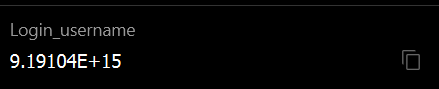
Hello Enpass Community, I am encountering an issue with my Enpass password manager where my numerical username is being converted to scientific notation. My username is 9191043356783128, but Enpass automatically converts it to 9.19104E+15, which causes login issues. This behaviour is in both android and PC. Here are the steps I've taken: Entered the username 9191043356783128 in the login field. Saved the entry in Enpass. When viewing or using the saved entry, the username appears as 9.19104E+15. This issue is problematic because the converted username is not recognized by the service I am logging into. In Bitwarden: In Enpass: I would appreciate any advice or solutions to prevent Enpass from converting the numerical username to scientific notation. If there are settings I can adjust or specific steps to take to ensure the username remains in its original form, please let me know. Thank you for your assistance!

-
Any updates?
-
Hi @Amandeep Kumar I am still having issue. Below are the details you requested. The language of the Bitwarden application used when exporting the data is English. Your 2nd point is not clear to me, I mean which files need to be compared? I don't see any attached file here to compare with my exported file. Below is the clip link as I am unable to upload here https://www.dropbox.com/scl/fo/deoitfp6bbbzs5el7nh2v/h?rlkey=6nio40qar73jimxsyxs7xrpx9&dl=0
-
Hey, I am still trying to understand because I also have lifetime plan. Does it mean that lifetime plan doesn't get future upgrades or only few years. While buying what I thought about lifetime was it would be as similar as premium monthly or yearly plan except I pay only once.
-
Hi Team, I am still having the issue.
-
Bitwarden Version: 2024.2.0 Enpass version: 6.9.3 (1593) Operating system (OS) version: Windows 11
-
HI Team, I was trying to import my data from Bitwarden, it shows count of entries to import but after doing all the steps, there is nothing which gets imported. I tried CSV and JSON both the format but same issue.
-
Could you please consider adding export/import options to the Enpass Android app? It would greatly help with data backup, migration, and overall user convenience.