

Marc Winter
Members
-
Joined
-
Last visited
-
A while ago we got the info "Important Update: Generator-Rules are now Passwort-Rules". This might sound good, but it isn't for everybody. We are MSPs and have to cover loads of passwords created by our customers. Now we have to choose between "not being able to generate very good passwords" or "having about 80% of the stored password criticized for being not compliant" - this doesn't make sense. We need to be able to have separate rules - or we need to be able to manually configure the generator to exceed the predefined limits of the rules.
-
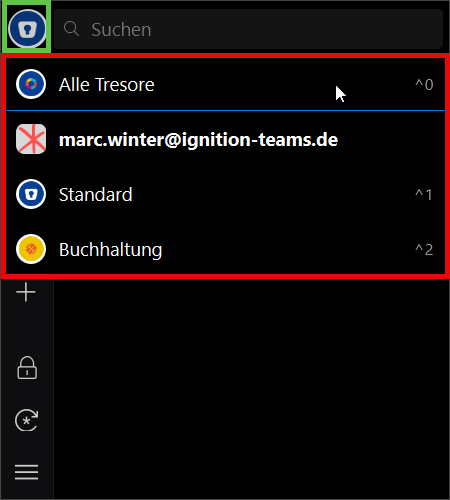
We're working with multiple vaults (8 and more) and have the following problem. I open a website with a login and right-click to a field to to open Enpass Assistant via the context-menu, as I usually have to switch vaults to find the correct login. Then I click on the top left icon in the assistant (green Box in the screenshot) to open the list of vaults and select the correct one. The following popup with the list of the vaults (red Box in the screenshot) has no scrollbar. This is no problem if there are a max of 4 entries, but when there are more, we need to scroll with the mouse wheel or use shortcut-keys or keyboard-arrows to select the desired vault. This is not intuitive and not user-friendly at all. There must be a scrollbar.
-
When clicking on the browser plugin's icon, it takes a second or two before the popup opens. I suspect, this is the time it takes for the plugin to contact the Enpass instance and get the requested informations. This doesn't feed very good for the user: I'd expect the popup to happen immediately. There could be an info like "requesting data..." or something until it displays the available logins. Furthermore, the Popup is being placed to the right, below the mouse pointer. In combination with the severe lag, this is more than awkward: if I click and move the mouse, the popup is displayed somewhere on the screen - exactly where I am with the mouse when the popup decides to materialize. This way, in multi-screen environments it's even possible to have the popup open on a completely different screen. Best regards, Marc
-
I have a similar situation as MrElectrifyer described: the freezing issue is the same, the scaling problems similar: My Notebook's display is 2880x1800 at 16" -> 200% scaling My two additional displays are 2560x1440 at 27" -> 125% scaling Obviously, the global scaling setting via variables doesn't help, and I usually have most problems, when the system returns from standby and/or is docked/undocked. In my case, it happens quite often that the browser plugin's popups are displayed so close to the screen bounds that I can see only the lower 5% of it, very often, the aren't displayed at all in the visible range of my screens. Using Enpass 6.11.2.1753 on Windows 11 Pro 24H2 26100.1586 Screen Layout: the two 27" displays are centered above the Notebook's display. Best regards, Marc
-
Having just imported about 500+ entries from Pleasant Password Server and about 400+ entries from Bitwarden, I'm missing an option to apply a Template to an existing entry. I have to manually align the imports to have the fields I'd like to use and remove tons of fields, I don't need, but the old system has exported with empty content. Userstory: When applying a template, the system should remove all unused fields that are not also contained in the Template; obviously, all missing fields from the Template should be added. This would save a lot of time when moving from old structures.
-
Marc Winter changed their profile photo
-
I'm referring to Enterprise-Environments with policies to prevent users from placing company data outside a desired environment (like M365). In this situation, users have two groups of vaults: one, titled with their mail address - the group containing the company-vaults, the other titled "Persönlich", containing the vaults the user has created outside the company. I propose to change "Persönlich" to "Privat". Why? it's very hard to explain to users what happens here: If you're used to M365 Business, you know that your OneDrive for Business is "Persönlich", but not "Privat". As I'm not sure, that there is the same differentiation in english between "Personal" and "Private", I'll explain: "Persönlich" means: it's the person's OneDrive, by default, nobody else gets access; nontheless it's a company drive; when the user leaves the company, the drive might be transferred to his successor. "Privat" means: it's his OneDrive. He will take it with him when he leaves the company. Here, he must not place ANY company-data. In Enpass, the vaults have the same functionality: the Vault "Standard" is located in the user's OneDrive for Business - so it's his "Persönlich"-vault. The ones he creates outside the company environment are "Privat", not "Persönlich".
-
It would be nice, to be able to change the icons of multiple entries at once to a specific icon
-
In our team of techs we're using Enpass to store logins to our customer's environments. We've created a template "M365 Admin Account" having some additional fields, we'd like to store with the usual Username/Passwort/OTP combination. Unfortunately we hit two limits when creating templates: 1.) We'd like to have a field type "Boolean" - a checkbox or a choice for Yes/No. 2.) We'd like to have a file type "List" - a dropdown-list with predefined values to choose from. Marc
-
While I understand the optionions of NicB and ARaceToTheGrave, I also totally understand, why this isn't available. As an admin I'd absolutely NOT want my users to store any larger files in Enpass. The attachment option is used by us for keyfiles, certificates and the such - all very small Text-files. If there'd be such an option, it would definitely slow down the system and create additional load for transfers. So it should at least be switchable. If people want to store larger files, it's fine by me, but I don't want it for my environment. File-sizes - as suggested - of 1GB are an absolute No-Go for any professional environments. People are supposed to store the files where they belong - and files of that size belong into OneDrive or SharePoint - these are made for such sizes. So perhaps it would be a solution to add an option to set a limit for file-sizes to 5, 10 and 100MB or something. Marc
-
Business Admin-Console doesn't seem to have any way other than Code-via-Email-MFA, which is quite annoying when you're in a hurry. While I totally agree that there should not be an opt-out for MFA here, there could be Passkeys and OTP as additional options. This would mean eMail could remain the ultimate Fallback. Marc