


LotsOfPAsswords
Members
-
Joined
-
Last visited
Everything posted by LotsOfPAsswords
-
@Chang666 Thank you for the response. I've tried a few things but it seems that only signing in manually works for this site at the moment. It's not a major problem but if all sites went that way ... it would be ! Happy New Year !
-
New users - as I was when I started this thread - or old users who are not paying so much attention - might appreciate a minor improvement in this area ...... In Settings > General > Behaviour ... a tickbox to have the Search field cleared automatically when user logs out of Enpass This would save confusion and would make life a little simpler
-
Ah - that explains why I can't read the attachment after adding it. Note that the online manual states "Add Attachment" whereas Enpass states "Add File". Also, it makes no mention of image files only. However, I can confirm that Enpass will open an image, after r-click and selecting Open
-
I've tried both those things I mentioned that the "save form" (or "webform") does not appear in the Assistant (or extension) So, the login screen is not being recognised by Enpass
-
This company has a new system and a new login screen to go with it https://portal.outfox.energy/sign-in Enpass worked on the old system a few weeks ago The new screen has 2 fields ... Email ID and Password. The Enpass login (I've manually updated the url) doesn't populate either field I've tried changing the Enpass field name from Username to Email ID (and the Field type) but it did not help. Enpass ignores the Email ID field in both cases. As for the Password field, Enpass offers to generate a password for me. So, my question is, what would trigger Enpass to recognise the two fields as username and password ? Presumably it is something about the setup of the web page that Enpass is looking for ... and the web page needs updating OR is there a way I can get Enpass to work as it is. I should say that the "Save form" option never appears on the Assistant
-
I only have 1 vault, so I do simply think the search field still contained data from my previous visit. Leaving data in that field might not be a good idea, but at least I now know to check it
-
In fact, I now see that when I log onto Enpass, it still contains data in the Search field ... that probably explains the "missing data". I'm not sure this is a good idea ...
-
As a Roboform user for nearly 25 years, I can tell you that Roboform does what I suggested above - and that is something Enpass should aim for
-
It's just occurred to me that if there was something in the Search field, it would look like data was missing. However, I don't believe I had been searching for something ... but maybe, somehow, something was sitting in the search field ... If no-one else has seen any missing data, then I suspect that something in the search field was the cause ... When logging onto Enpass, the cursor defaults to sitting in the Search field. Therefore, if I hadn't noticed that, (and I hadn't realised this was the default starting position) I would only have to touch any key and the list would be limited. So, something for new users like myself to bear in mind !
-
Occasionally, a bookmark leads nowhere because the URL of the sign-in page has changed. When I find the new sign-in page (with a new URL), Enpass happily fills the username and password BUT does NOT offer to update the URL on the Enpass login. I can do it manually, but it would be much better if it offered to update the Enpass record OR offer to allow me to save this new URL as a new login in Enpass. Is there a way to force Enpass to do the above ?
-
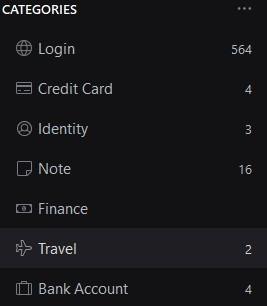
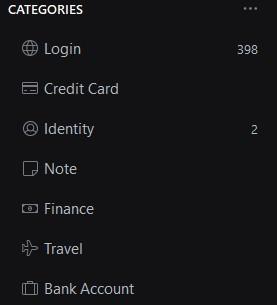
I've just restored the Enpass folder from a backup last night and everything is back How could data (some of it) disappear overnight ??? The PC was shut down till this morning. How could SOME Enpass data, but NOT all Enpass data disappear ?? Or at least, not be visible ...
-
I've only been using Enpass for a couple of weeks and all has seemed fine ... till today I just logged on and discovered all the Credit Card, Note, Travel and Bank account data has vanished !! I have a backup so I should be able to recover BUT how can this happen ?? Version is 6.11.11 (1973)
-
I've just started using Enpass and everything is looking god generally, but scrolling down my list of 600 logins items takes far too long. The spacing between each item is far more than is necessary. I'd be happy keeping the text the same size but shrink the space by one third or two thirds - so 3 options. Maybe offer text sizes too if you choose BUT changing the text size smaller would look really odd without changing line spacing.
