


Anthony
Members
-
Joined
-
Last visited
Everything posted by Anthony
-
There is a difference between using betas within a current version line and being forced up to a major new version of a product which is completely incompatible with the previous version (and to which they've botched up the upgrade). This morning I found my phone had been upgraded to Enpass 6. My PCs are all using Enpass 5. I'm now screwed. So, I did not have a choice in this matter. Please refrain from telling people how to feel when you really don't understand the full circumstances.
-
What does this even mean? It seems that the link in the article downloads a standalone enpass.exe There is no installer. How does this "come over the existing Enpass 5 application"? Do you copy it manually? What if you are using the bridged traditional desktop vesrion of Enpass 5? does this still apply?
-
Agreed. This is a mind-numbingly stupid architectural decision. Why on earth would I want to set up multiple cloud providers just so I can sync multiple vaults? Most *normal* people have settled on (or only ever been exposed to) one single cloud provider and Enpass *should* support base functionality like multiple vaults based on this premise.
-
I've just been forced to the Enpass 6 beta. I've installed Enpass 6.0.0.198 and during the setup when asking where to restore the database from I selected OneDrive. It took me to the Authorisation page which showed as successful, however, in the app it just sat there hourglassing. I gave up and restored from a local backup I made. I then when into the app to setup Sync, and again, OneDrive sync setup failed with the exact same symptoms as above. I then tried to setup Sync using Google and got the exact same symptoms as above.
-
I am REALLY pissed off at this. Honestly, how dare you force me into a beta situation. I RELY on my password vault across my PCs, tablets, and phone 10s of times per day and I need to working 100% reliably. Now, you decide to forgo the previous side-by-side beta experience (a good way to do it) and force everyone into your beta?? I appreciate you want to put out the best version of the product on release and thus it probably made sense in your minds to pull in more users to beta test, but FORCING us into your beta test program with no way to decline or opt-out is simply unforgivable. I had always been a strong advocate of Enpass over other solutions like Lastpass but this behaviour by you will make me never in good faith recommend your product again.
-
I am REALLY pissed off at this. Honestly, how dare you force me into a beta situation. I RELY on my password vault across my PCs, tablets, and phone 10s of times per day and I need to working 100% reliably. Now, you decide to forgo the previous side-by-side beta experience (a good way to do it) and force everyone into your beta?? I appreciate you want to put out the best version of the product on release and thus it probably made sense in your minds to pull in more users to beta test, but FORCING us into your beta test program with no way to decline or opt-out is simply unforgivable. I had always been a strong advocate of Enpass over other solutions like Lastpass but this behaviour by you will make me never in good faith recommend your product again.
-
I totally agree with this. While I love beta testing, my password vault is too important for me for day-to-day use. I can't afford issues. I was watching the v6 beta and liked the fact that it could run side-by-side with v5 as it was independent and ran its own upgraded database file. However, being forced into a beta scenario, which I on;y found myself because my phone app (Android) was upgraded this morning, is NOT OK. You say you Love your users. Not giving them a choice is a very strange type of Love.
-
I'm seeing this issue more and more often now across multiple PCs. All running: Windows 10 1803 (17134.254) Microsoft Edge 42.17134.1.0 Enpass 5.6.19 (5548) (Desktop App through Microsoft Store) Enpass Edge Extension 5.5.2 If I go into the Enpass App -> Tools -> Settings -> Browser and Toggle 'Enable Browser Extensions' OFF and then back ON, then the Enpass extension works immediately.
-
Yep, I also got 5.6.19 (5548) from the Store overnight. Hopefully this puts an end to this issue!
-
Fingers crossed! I've had nothing pushed to me in the Store as of writing this so I guess they didn't provision me to receive the beta updates.
-
I've not seen any evidence of 5.6.17 NOT crashing on Windows 10 1803 (17134.112)?
-
So I was contacted by Enpass via private message to provide my MSA so I could be pushed a beta build through the Microsoft Store to test a fixed version. I was contacted 8 June I replied 9 June I followed up 14 June as I hadn't seen or heard anything As of today 16 June, still, nothing I know they've been trying to get Enpass 6 beta out the door and been harassed a lot about delays and poor communications around the beta, but still, this is a pretty serious issue and is being so poorly handled.
-
Come on Enpass team - your handling of this issue is pathetic. Surely it is not hard for you to look up a build number of Windows and see that it is a release build and not a preview build. So many reports of this issue here and on your Twitter feed and yet the ONLY feedback you have given is "Try uninstalling Store app and install MSI version from Enpass website". Pick up your game guys!
-
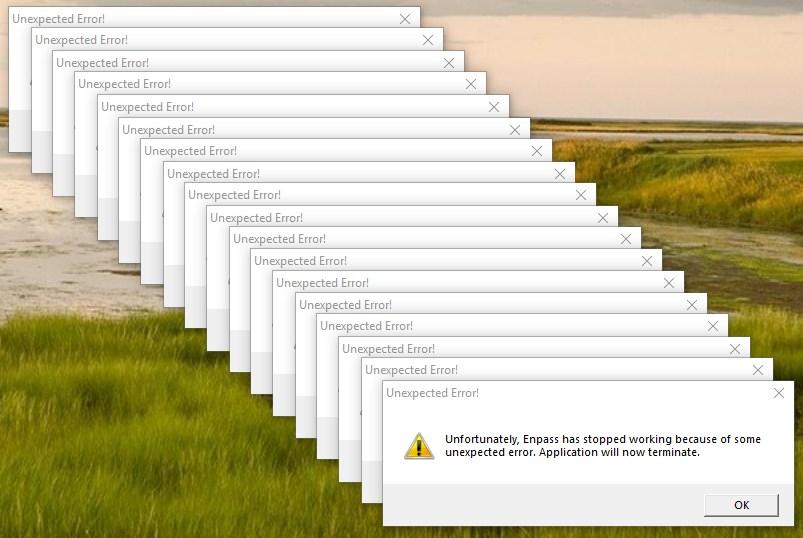
+1 I woke up this morning to this (below): Like others, had also just recently installed KB4100403 (https://support.microsoft.com/en-au/help/4100403/windows-10-update-kb4100403) and rebooted about 8 hours prior. All the crashes occurred with zero interaction. Enpass 5.6.17 (5428) Windows Desktop from Windows Store Windows 10 x64 1803 (17134.81) Hopefully the 5.6.9 build mentioned earlier in this thread solves the issue and can be pushed through the Microsoft (Windows) Store A.S.A.P.!
-
I have also just encountered this issue. Windows 10 Pro x64 1803, Edge Browser, Enable browser extensions was already enabled. Enpass Extension for Edge Browser v5.5.2 Enpass Desktop (Windows Store bridged) v5.6.6 I generally see these issues when the Windows Desktop app is locked, and I then click on the Enpass browser extension button to invoke Enpass. It is as though it is not always cleanly handling communication to the locked desktop app.
-
Unfortunately, it is completely random. I have not yet identified any repeatable or consistent behaviour to trigger the crash. Just for awareness, my system is in the Release Preview ring and is now Windows 10 v1803 (OS Build 17134.1) with Microsoft Edge 42.17134.1.0 Does Enpass generate any logs, or is there debug logging I can leave enabled for next time it happens? If not, can you produce an instrumented version?
-
-
I'm seeing the same (Enpass 5.6.6 on Win 10 16299.309). It is frustrating as it is only occasionally it opens in a smaller window and as soon as I grab the frame handle to resize it "pops" back to the correct window size.
-
Since Enpass 5.6.6, I have started getting sporadic crashes. It is often when I have logged into a website, Enpass has popped up and asked me to enter my PIN to unlock and validate what I entered matched what is in Enpass. When it occurs, Enpass generates a dialog box that says: Unfortunately, Enpass has stopped working because of some unexpected error. Application will now terminate. Nothing is logged in the Windows event logs. Is there any data I can collect to provide you to assist in troubleshooting these crashes? I am using Windows 10 x64 v16299.214, Edge browser, and Enpass 5.6.6 desktop bridge version installed from the Microsoft Store
-
Optional is fine by me.. That said, I don't agree with some of your logic. If you are concerned about security, you would not likely enable PIN which is much easier to 'guess attack' from the console than the more complex master password. If you enable PIN, you aren't really concerned as about security of the console of your device, so my suggestion is an extension of that, and only applied to PIN, not entering master password.
-
I would like to suggest removing the need to hit the Enter key when entering in a PIN, and possibly also Password, to unlock Enpass. Hitting the enter key here is a completely redundant step when entering a password into an application, especially the PIN option after having already unlocked Enpass with Password at least once since launching it.
-
+1 More logos is desperately needed.
-
+1 Should focus on integration with keyboards such a Gboard, SwiftKey, and Samsung keyboard (Samsung just because many won't change default)
-
-
+1 on this topic which has been on the roadmap for 7 months now... C'mon guys, can't be that hard.

