


aa11
Members
-
Joined
-
Last visited
Everything posted by aa11
-
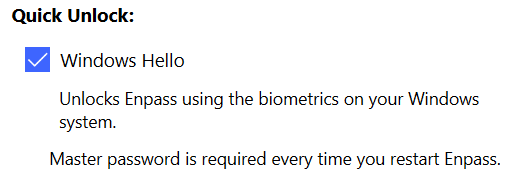
I've been using Enpass with full Face ID unlock for years. Recently, I updated BIOS on the PC and the option to unlock Enpass with Windows Hello after the system (or Enpass) reboot is gone. I now see "Master password is required every time you restart Enpass". How can I restore the full Windows Hello functionality? I tried deleting and re-registering Face ID in Windows Settings, but this didn't help.
-
CPU: Intel Core i5-7200U TPM: Intel (INTC) 2.0 (11.6.25.1229)
-
Yes, it's the Store version in both accounts. I tried uninstalling and reinstalling it in the affected account, no difference.
-
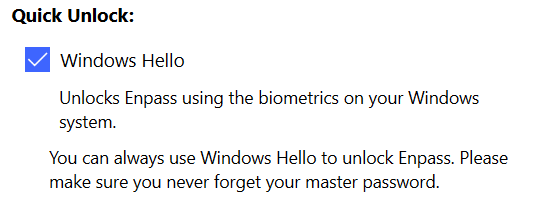
I have 2 user accounts on a Lenovo Ideapad laptop. Both accounts are admins, both can login to Windows with Windows Hello (PIN, Face, Fingerprint). Both accounts have the Windows Store version of Enpass installed. The issue is that one account can unlock Enpass with Biometrics or Hello PIN at any time, including after reboot. The second account always has to provide the full Master Password every time Enpass is closed. Below are Quick Unlock sections for both accounts in Enpass.
-
OK, thanks. I'll try to reinstall first and if the issue persists, will share the logs.
-
Thanks. Can you tell me where I can find the crash logs what's the best way to share them with you? Is there any functionality I lose when using the website version?
-
I have an issue where Enpass regularly (few times a day) freezes and crashes. Then after re-launching, it freezes again, either immediately or after a few seconds. The only way to get it back operational is to reboot the PC. I also tried restarting explorer.exe, and all the browsers, but this doesn't help. Obviously it would be ideal if Enpass wasn't crashing at all, but at very least I would like to have a workaround to get it back without having to reboot. I use Windows 11 (21H2), but I think it was happening on Windows 10 as well (although not a frequently). Enpass is up to date Windows Store version.
-
Currently, global search does search for text within notes, but it doesn't give any indication where the search string was found within the note, which makes it useless for large notes. An alternative would be a separate search field for notes. I've had response from Enpass back in 2018 that this feature was already on the roadmap, but it never materialised. I don't think this is very unusual use case, there are few other queries in forums requesting the same feature. Currently, to search within notes I have to edit the note, copy all text, paste to notepad, then search in there - hardly an elegant solution...
-
Any chance of implementing a feature that allows searching within secure notes? I believe global search does search within notes, but as it doesn't highlight where within the note the search term was found, it's pretty useless with large notes...
-
Well, that's disappointing... Does it mean this feature has been dropped from your roadmap? Would it help if I added as a new request in the "reature requests" forum?
-
Hi @Anshu kumar, Any updates on this (after a year)? I'm still waiting patiently for this feature to be implemented. However, it's getting a bit tiring to constantly copy and paste Enpass notes into a Notepad to do simple searches...
-
Hi, when a login or secure note is in edit mode you can select text using standard Windows key combination SHIFT+ARROW KEYS. This does not work though when the item is not in edit mode. Any chance of having this work consistently in both modes?
-
Hello @Anshu kumar, it's been 5 months... Is this feature still on your roadmap?
-
If I understand correctly V6 upgrade replaced folders with tags. The issue I'm having is that changing tag name on PC a doesn't change it on iOS (and vice-versa). Syncing via WebDAV and everything else seems to be synced correctly.
-
Thanks. Is it in a roadmap for v5 or v6? Any indication on timing?
-
Hello, I just moved to EnPass and everything looks great but there is one feature that is either missing or I can't find it... I have quite few large secure notes. When I do a global search in EnPass it does find text inside these notes, but there is no indication where the actual text is. Is there a way to make global search highlight where the text was found? Or alternately do a local search inside a secure note like in some other password managers?

