

Skip to content
View in the app

A better way to browse. Learn more.

Enpass Discussion Forum

A full-screen app on your home screen with push notifications, badges and more.

To install this app on iOS and iPadOS
  1. Tap the Share icon in Safari
  2. Scroll the menu and tap Add to Home Screen.
  3. Tap Add in the top-right corner.
To install this app on Android
  1. Tap the 3-dot menu (⋮) in the top-right corner of the browser.
  2. Tap Add to Home screen or Install app.
  3. Confirm by tapping Install.

SimSon

Members
  • Joined

  • Last visited

Everything posted by SimSon

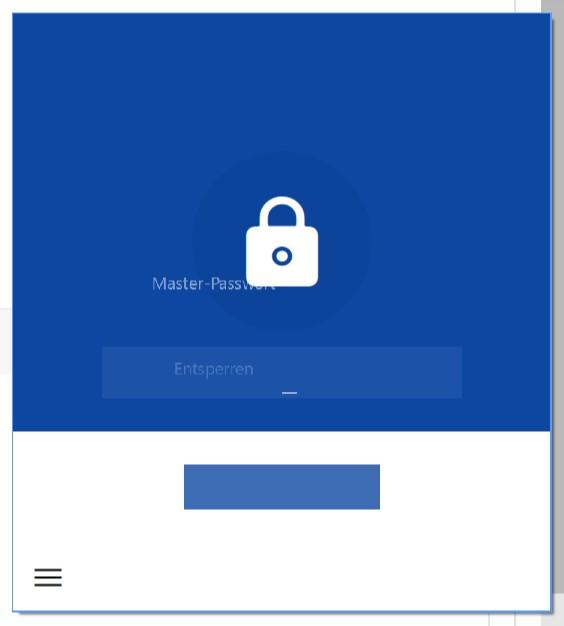
  1. Hey guys! Since the last update I've got big problems with the scales (maybe bad translation - sorry!). Just have a look at the screenshot - the whole application looks like this. Hope you can fix this as fast as possible Cheers!
  2. Hey Team! I found a small misteak in german translated android version. You translated the "sort fields" option with "felder entfernen" which means to delete the fields. Just change the translation to "Felder neu anordnen" or even closer to the english version "Felder sortieren". Cheers!
  3. Hey! I'm missing a function to delete multiple fields at once in an entry, especially empty fields which I don't need for my new entry. Could you add this or at least a function to delete all unused/empty fields in an entry at once? Cheers!

Account

Navigation

Search

Search

Configure browser push notifications

Chrome (Android)
  1. Tap the lock icon next to the address bar.
  2. Tap Permissions → Notifications.
  3. Adjust your preference.
Chrome (Desktop)
  1. Click the padlock icon in the address bar.
  2. Select Site settings.
  3. Find Notifications and adjust your preference.