Dominion
Members
-
Joined
-
Last visited
-
Hello, after a while, i tried again to solve this problem. I tried the suggestions above, with no effort ("Wrong password") First, i think its not a problem of Enpass, it's a problem of this single computer... I try to create a new vault, with a really simple master password, but it doesn't matter which storage place i use (Webdav, Home Directory, OneDrive), on every try, i receive the message "There seems to be problem on create the vault" (in original, the message is in german), with no further information. I have no idea what else i can do, so i give up. Is there a log where i can get more information? Thanks for your help. Best regards Frank
-
Hello, sorry for the late answer. I've done the following: - Deleted the (one and only) enpassdbsync-File on the WebDav-Server - uninstalled the enpass app - re-installed the enpass app with the commands provided by kurtedward - Entered the data for the WebDav-Access - Enpass app found the vault and wants the master password - Entered the Masterpassword and ... BÄM ! "Wrong password" - Typed this text until this line above - Tried again to connect to the vault without changing the text in the password field - "Your data were restored successfully" (originally in german...) - But Enpass is empty. If i try to connect again to the webdav server i got the error message "There can only be one standard vault" I have only one vault, not multiple. And it is only this one pc, where Enpass didn't work. I have other computers (with Linux Mint 22, same as on the "failing" installation, Android, Windows 10) and it works everywhere, only on this machine here it fails. What else can i do? Best Regards Frank
-
Hello, i use Enpass since years on Windows 10 and Android without problems. Now i'm on the way to use Linux. I have set up a pc with Linux Mint 22 and installed Enpass and it works like a charm. Now i have installed Enpass on another pc with Linux mint 22 (via apt-get) and it won't work. After install, Enpass ask for setup a synchronization. Here i choose "WebDav" (which works on all other machines), and enter the credentials for the webdav server. Then Enpass wrote that it has found a vault in the webdav-folder and i should provide the master-password. But here, it says always "Wrong password". I have entered this password in a textfile, so i can see it, and tested the same password with the synchronization on the other machine (works!), so it is proved, that the password is correkt. Same behaviour if i try to restore a backup or use a wifi-sync-server. I'm out of ideas. Does someone have a idea, what else i can do? Best Regards Frank
-
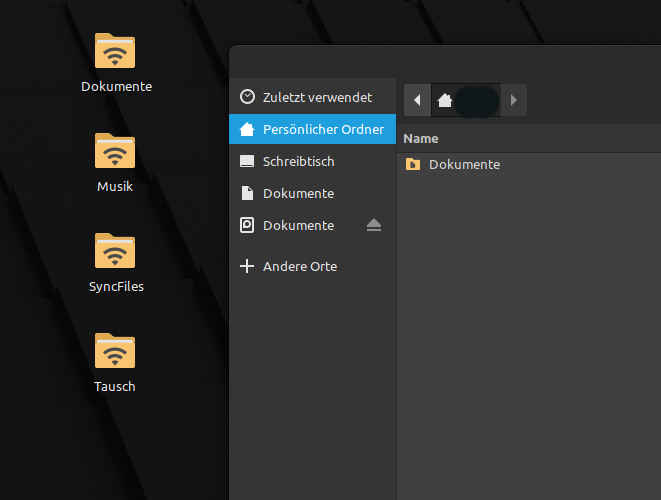
Hi, found it. The reason for this problem was that i've installed enpass with the App-Manager of Linux Mint as Flatpak. After i've deinstalled this version and reinstalled in a console window (following the instructions on the enpass website), it runs like a charm. Funny fact: The problem i've described in this posting is also gone, all folders are shown. Thanks. Best regards Frank
-
Hi, i created the folder ~/.config/Enpass (why not created at installation?) and set access and ownership like you mentioned above. After that, i un- and reinstalled enpass (with the appmanager of Linux Mint as Flatpak) and set the configuration. But nothing is stored in ~/.config/Enpass (and no error message is coming up), same behaviour after restart: Enpass wants to set a new configuration. As you suggested, i wrote a mail to support@enpass.io. Regards Frank
-
Hello, i try to run Enpass under Linux Mint 21, but after every restart of the system, Enpass has forgotten the configuration (Sync-Mode, Tresor etc) and starts the configuration process from new ("Enter Activation Code" and so on). What can i do? Any help is welcome Regards Frank
-
Problem solved: Using webdav. I have to change the sync on all other devices, but it works, that's the main thing.
-
Hello, i try to configure Enpass under Linux Mint 21. Installation works fine, the syncfolder ist stored on a network drive which is mounted by fstab (and is displayed and accessible from the desktop). These folder can used for sync from a windows version of Enpass and from an android device without problems. The syncfolder is a network drive, mounted in the home-directory of the current user ("SyncFiles"), but is not displayed in the folderselect-Dialog of Enpass. Can anyone point me in the right direction? Any help would be appreciated. Best regards Dominion