

Skip to content
View in the app

A better way to browse. Learn more.

Enpass Discussion Forum

A full-screen app on your home screen with push notifications, badges and more.

To install this app on iOS and iPadOS
  1. Tap the Share icon in Safari
  2. Scroll the menu and tap Add to Home Screen.
  3. Tap Add in the top-right corner.
To install this app on Android
  1. Tap the 3-dot menu (⋮) in the top-right corner of the browser.
  2. Tap Add to Home screen or Install app.
  3. Confirm by tapping Install.

Balta

Members
  • Joined

  • Last visited

Everything posted by Balta

  1. Its working now as the update is released for everyone, it took a while but thank you guys for addressing the issue.
  2. That feature have a purpose doesnt it? this have been enabled in my computers for a very long time without problems, I understand there are workarounds but what about fixes? or is this feature abandoned? Is enpass team able to reproduce the problem on their end?
  3. Is there any official statement about this? fixes coming?
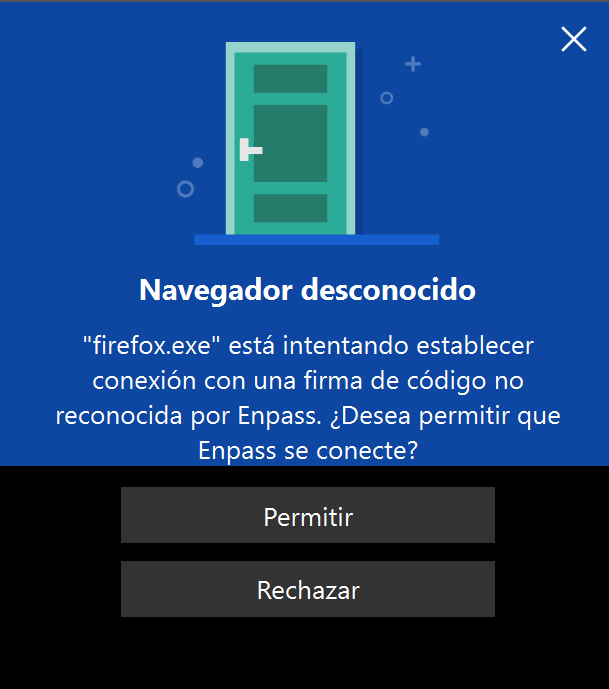
  4. Hi, in my 2 PC using firefox and the official Enpass extension in windows 11 (edge works fine) I get this message when I try to autofill with firefox extension, it started happening today, I have been using it without problems in these PC for months, until today, obviously I already configured the extension with the PIN code in order to use it. There is a screenshot with the popup message attached, let me translate it for you: I am closing this popup everytime until I know what is happening, any clues?, does it happen anyone else?
  5. Same here on windows 11. This is not the first time that an update in the microsoft store has broken enpass... the quality control needs improvement.
  6. Same error code (and problem), windows 10 22h2. Lets hope another update addresses this quickly.

Account

Navigation

Search

Search

Configure browser push notifications

Chrome (Android)
  1. Tap the lock icon next to the address bar.
  2. Tap Permissions → Notifications.
  3. Adjust your preference.
Chrome (Desktop)
  1. Click the padlock icon in the address bar.
  2. Select Site settings.
  3. Find Notifications and adjust your preference.
