


cbailiss
Members
-
Joined
-
Last visited
-
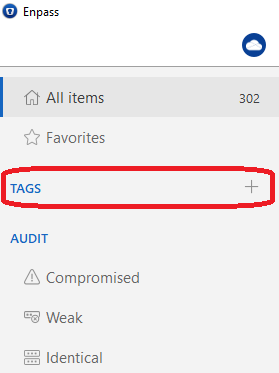
I am using 6.8.2 and having this same problem. The "TAGS" item is showing but there is nothing in it/under it. Clicking on it/around it does nothing. I can see tags present on individual passwords (e.g. searching for a password by name then viewing it shows the tag is still attached to the password). But the UI navigation refuses to show me any tags (see attached image below). When will this be fixed? It is a really big bug.
-
I have submitted a crash report. In the comments of the crash report I entered the text below. So if you search your crash reports for this (or just my name cbailiss) you will find the crash report. The steps that produced the crash report are exactly as described in my first post. See thread https://discussion.enpass.io/index.php?/topic/8574-frustrated-unable-to-restore-data-from-one-drive-after-minor-update/ in your support forum. "Frustrated - unable to restore data from One Drive after minor update" cbailiss.
-
cbailiss joined the community
-
I use enpass in three places: 1) Android Phone 2) WIndows 10 PC 3) Windows 7 PC All three sync via One Drive. I upgraded sometime ago to V6. Enpass was working fine on all three devices. Recently I tried to update Enpass on windows 7 (a minor enpass update 6.x to 6.x). Since then, I have been unable to restore the data onto the windows 7 device. When I try to, I am redirected to the browser, I log in and get the "Authorisation Finished" message in the web browser. I am redirected from the browser back to Enpass. Enpass prompts for the password (I assume this is the normal one I enter when opening the app). I enter this password and immediately Enpass crashes. Very frustrating. The issue started with the update to the 6.0.2 version and I was hoping a further update would fix it, but it hasn't. I am still having the same problem with 6.0.6. Any suggestions on how I can fix this? Thanks