


Richar0d
Members
-
Joined
-
Last visited
-
argh, forget that folks. Wrong board
-
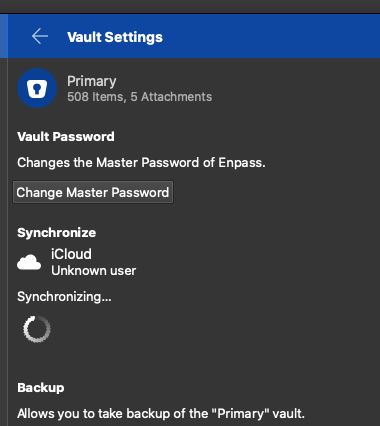
I use Enpass instead of 1Password since a few weeks. All went fine, synchronizing between iMacs, MacBooks, iOS-Devices. But since a few days, the iMac Pro Enpass is in a synchronizing loop with iCloud - Unknown User - Synchronizing... -Loop-Icon If I change/add items to Enpass, there is no synchronization. How can I stop and reestablish synchronizing settings? Has anyone this behavior, too? Thanks in advance, Richard Edit: This worked for me:
-
Richar0d joined the community
-
I use Enpass instead of 1Password since a few weeks. All went fine, synchronizing between iMacs, MacBooks, iOS-Devices. But since a few days, the iMac Pro Enpass is in a synchronizing loop with iCloud - Unknown User - Synchronizing... -Loop-Icon If I change/add items to Enpass, there is no synchronization. How can I stop and reestablish synchronizing settings? Has anyone this behavior, too? Thanks in advance, Richard