
voyager
-
Posts
3 -
Joined
-
Last visited
-
Days Won
1
Posts posted by voyager
-
-
Hi there,
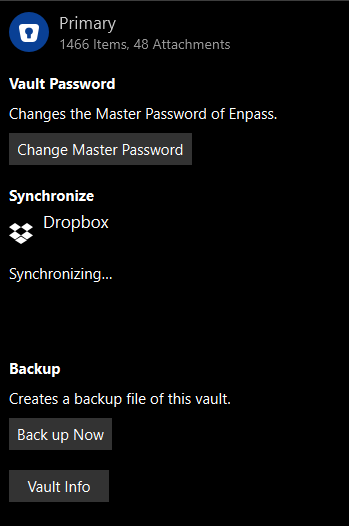
I've noticed recently that I'm having issues synchronizing my vault with Dropbox.
I used UWP version and I thought that might be the issue, so I've removed that one and installed a standalone app, but that is exhibiting the same issue.
When started the app will sync with Dropbox, but after the first sync it will just get stuck with a Synchronizing... message.
I kill the app, start it again, it synchronizes once and then the next synchronization hangs again.
Have you seen this behavior before? Attaching a screenshot (removed my email from it).
The issue happens only on Windows 11, not on Windows 10.
-
And to add to what @Discordantsaid, if you're using Gmail or Google Apps and let's say your email is user@gmail.com, you can create aliases on the fly.
Say you're registering at BBC website, then you can write your email is user+bbc@gmail.com and every email sent to that email will arrive to your user@gmai.com email.
Of course, you will not be able to send an email from user+bbc@gmail.com, but you will receive all sent to it.
-
 4
4
-
Only the first sync with Dropbox after a restart is successful
in Enpass Support & Troubleshooting
Posted
Thank you Manish, this sorted the issue, I can now sync again with the cloud after the initial sync.