portboy
-
Posts
10 -
Joined
-
Last visited
-
Days Won
2
portboy's Achievements

Newbie (1/14)
2
Reputation
-
This is a verry bad issue .... noy sync between versions .... . "Hopefully, the same will be available very soon." OMG, you write this since one year ... (see thread "The First Beta of Enpass v6 for Portable Apps is out!") Software is nothing for hope ... I must realized, that the payed money to enpass are just sunkcosts ...
-
"in the future" or "available soon" You mean in 2020 oder more 2021? Sry for this, but the only answers we got in the last month are phrases with a little bit hope for .. for my side I think, nothing will happen.
-
The actual version 6.0.7 (301) forget the location of the database after restart of the computer. My System: Win10 (1709)
-
Any timetable for "available soon" ? br portboy
-
When will come the next update ....
-
thx, but I do not have the right on the system to do the .NET update that's the reason why I’m using the portable version
-
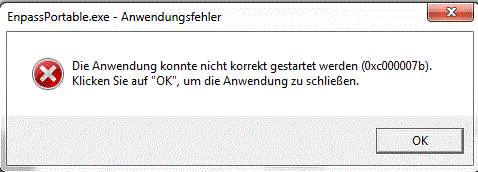
On my Win 7 computer I get the following error: I'm not able to start the program br Robert
-
I use the portable version for Windows (5.6.10) and the app for Android (6.0.6.200) on a Huawei. It doesn’t matter witch sync point I use (OneDrive, Dropbox, etc.) The portable version on Windows don’t see the new entries from the Android app an the app does not see the new entries from the portable app. this is very frustrating
-
Hi, I have a strange issue with enpass. Enpass desktop (actual Version) is running on an win10 pc. Every time I will log into enpass desktop app, I must enter the password twice. The first input end every time in a login error …. it doesn’t matter if I enter the pwd with copy/past or normal with keyboard …. This is very annoying. I have this issue since the last versions of the desktop app. Is this a bug or a wrong installation? br rob
-
I have the same issue. Your Suggestion did not solve the Problem. Actually not useable under Win10
.thumb.png.d845368657d5fc58125d790d04a5eec8.png)

.png.386bfd1c0be538f05393af49cfe6cdca.png)