Search the Community
Showing results for tags 'enpass 6 beta'.
Found 2 results
-
 Hey guys! We are incredibly excited to announce the first beta release of our most awaited update - Enpass 6. You're more than welcome to join us to help in building a better Enpass for you. This is the first beta version of Enpass for Windows to help you guys get a whirl of the latest features. We know the beta build will have features that are still in progress, the app will be less stable than you’re accustomed to. Feedback on stability, as well as any other performance issues you experience, is crucial and extremely appreciated. You can download and install the beta from here and for further information head straight to our blog post. Cheers!
- 33 replies
-
- 2
-

-
- enpass 6 beta
- enpass 6
- (and 1 more)
-
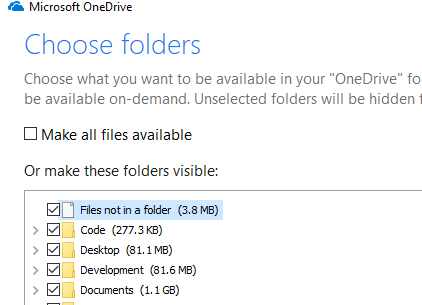
 Hi, Since installing the enpass 6 beta I have been running into cases where chrome locks up on launch for over 60 seconds. I have since discovered this is a cumulative effect of 3 settings: OneDrive Being allowed to sync all of Documents: Enpass 6 storing its tmp directory in documents: C:\Users\<user>\OneDrive\Documents\Enpass6-Beta\.sync The Enpass Password Manager extension for Chrome using the .sync directory on launch. The fix is pretty simple in Microsoft OneDrive Settings -> Account -> Choose Folders unselect the enpass directory Since most of my settings were default, I expect others are having the same issue and are not sure how to fix it, hopefully this helps.